
Backdrilling
Unused portions of vias (i.e., stubs) can create significant signal integrity disturbances. Backdrilling is a technique that removes these stubs. A backdrill can be defined in a combination of ways, as shown in the following screenshot.
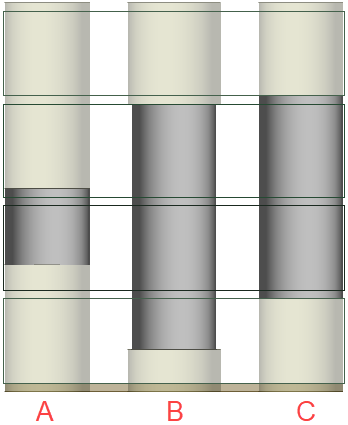
A – By Depth: a user-specified length from above the top of the stackup, below the bottom of the stackup, or from both above the top and below the bottom of the stackup
B – By Layer with an offset (i.e., user-specified stub length): a user-selected stackup layer is selected on the To Layer drop-down menu. The backdrill will reach to the specified distance offset on the layer from above (i.e., when set in a Top subgroup box), or below (i.e., when set in a Bottom subgroup box).
In this example, a layer and offset were selected on the Top subgroup box, but a user-specified depth is set in the Bottom subgroup box.
C – By Layer (with no offset): a user-selected layer is selected from a drop-down menu. The backdrill will reach it from above (i.e., when set in a Top subgroup box), or below (i.e., when set in a Bottom subgroup box).
Viewing Backdrill Properties
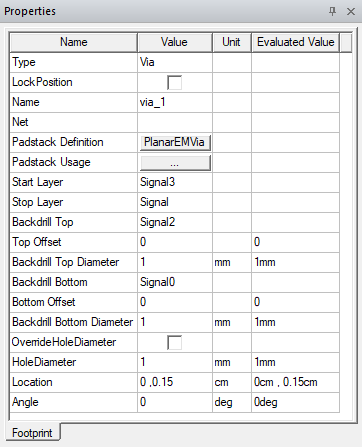
A backdrill can be added to any 3D Layout design that includes a via, assuming the via's padstack definition has been configured (refer to Drawing a Via in the Layout Editor and Editing a Padstack). If a selected via has a backdrill, the Properties window will populate with a list of associated parameters.
Continue to Defining Backdrill Parameters.