
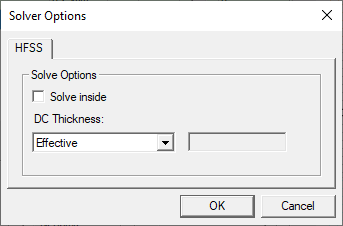
Configure solver options on the Solver Options window.
Follow these steps to reach the Solver Options window.
-
Navigate to and select Layout > Layers to open the Edit Layers window.
-
Choose Select signal from the drop-down menu to enable the options in the Analysis area.
-
Check the Solver check box to enable Solver .
-
Click Solver to open the Solver Options window.
-
Make selections from the following options:
- Solve inside — enables all objects in the layer to have "solver inside" attribute for HFSS solver. It is possible to perform solve inside on an object-by-object basis. See HFSS 3D Layout Properties for more information.
- DC Thickness — Controls how DC thickness
is calculated for the conductor lumps on the layer.
- Effective: Calculates as twice the volume/surface area
- Layer: Use layer thickness
- Manual: Use user specified value