
Overview of Electronics Desktop Scripting Objects
When you record a script using Ansys Electronics Desktop, the beginning of the script must contain some standard commands, as illustrated in the following chart. The commands in the chart define the objects used by Electronics Desktop in the script and assign values to these objects. The objects are used in the hierarchical order shown.
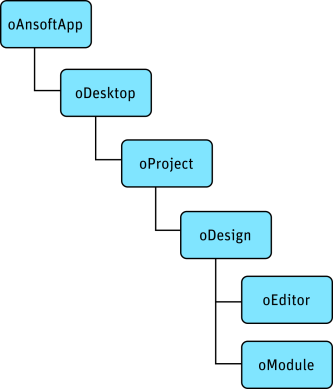
The commands are described below, followed by examples.
oAnsoftApp
The oAnsoftApp object
provides a handle for Iron Python to access the Ansoft.ElectronicsDesktop product.
In Iron Python, for example:
oAnsoftApp = CreateObject('Ansoft.ElectronicsDesktop')
oDesktop
The oDesktop object is
used to perform desktop-level operations, including project management.
In Iron Python, for example:
oDesktop = oAnsoftApp.GetAppDesktop()
Consult the following for details about script commands
recognized by oDesktop:
oProject
The oProject object corresponds
to one project open in Electronics Desktop. It is used to manipulate the project
and its data. Its data includes variables, material definitions, and one
or more designs.
In Iron Python, for example:
oProject = oDesktop.GetActiveProject()
Consult the following for details about script
commands recognized by oProject:
oDesign
The oDesign object corresponds
to a design in the project. This object is used to manipulate
the design and its data, including variables, modules, and editors.
In Iron Python, for example:
oDesign = oProject.GetActiveDesign()
Consult the following for details about script
commands recognized by oDesign:
oEditor
The oEditor object corresponds
to an editor, such as the 3D Modeler, Layout, or Schematic editor. This
object is used to add and modify data in the editor.
In Iron Python, for example:
oEditor = oDesign.SetActiveEditor('3D Modeler')
Consult the following for details about script commands recognized by oEditor:
There is no Reporter Editor object for oEditor. Reporter Editor commands are executed by oDesign.
oModule
The oModule object corresponds
to a module in the design. Modules are used to handle a set of related
functionalities.
In IronPython, for example:
oModule = oDesign.GetModule('BoundarySetup')
Consult the following for details about script commands recognized by oModule:
- Analysis Module Script Commands
- Boundary and Excitation Module Script Commands
- Field Overlays Module Script Commands
- Mesh Operations Module Script Commands
- Optimetrics Module Script Commands
- Radiation Module Script Commands
- Reduce Matrix Module Script Commands
- Solutions Module Script Commands
Example Script Opening
Combining the above objects, a script in Iron Python could begin like the following:
oAnsoftApp = CreateObject("Ansoft.ElectronicsDesktop")
oDesktop = oAnsoftApp.GetAppDesktop()
oProject = oDesktop.SetActiveProject("Project1")
oDesign = oProject.SetActiveDesign("Design1")
oEditor = oDesign.SetActiveEditor("3D Modeler")
oModule = oDesign.GetModule("BoundarySetup")
GetActiveProject and GetActiveDesign for Wider Use
The sample script above only works for "Design1" within "Project1". To create a script that is usable for any open project, you can use one or both of GetActiveProject and GetActiveDesign.
In IronPython:
oProject = oDesktop.GetActiveProject()
oDesign = oProject.GetActiveDesign()