
The Various Hotkeys
A hotkey is a specific key, or combination of keys, that you can press to perform a task more quickly than by using the mouse. For example, if you want to fit the extents of a model within the 3D Modeler window, simply press Ctrl + D. This hotkey combination is quicker than navigating the View menu or locating a command on a ribbon tab, especially if your hands are already on the keyboard.
Common hot keys, often in conjunction with a mouse button, are used to perform pan, rotate, and zoom operations. Additionally, you can use hotkeys to produce standard planar (XY, YZ, XZ) and isometric views of geometry in the modeling window.
To pan the view, press Ctrl + middle-click and drag the mouse. Alternatively, if the Enable Legacy View Navigation option is selected in the User Interface Options, you can also press Shift + left-click and drag to pan the view.
To rotate the view press midle-click and drag the mouse. Alternatively, if the Enable Legacy View Navigation option is selected in the User Interface Options, you can also press Alt + left-click to rotate the view.
To zoom the view, middle-click and drag the mouse upward (zoom in) or downward (zoom out). Alternatively, if the Enable Legacy View Navigation option is selected in the User Interface Options, you can also press Alt + Shift + left-click and drag upward/downward to zoom the view in/out.
Holding down the Alt key while double-clicking the left mouse button orients the view in the Modeler window as shown in the figure below. The resulting view orientation depends on which of the nine zones the cursor occupies when you double-click. Each cube in the figure represents a clicking zone and shows the resulting view orientation:
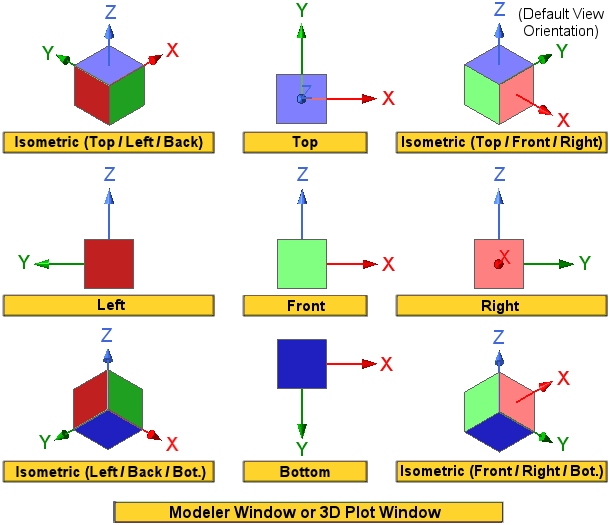
There is no Alt + double-click zone associated with the standard Back, Dimetric, or Trimetric view orientations. These three views must be selected from available menu or ribbon commands.
There are a number of additional hotkeys. They are broken down into two groups: General Hotkeys and 3D Modeler Hotkeys, which are discussed in the next two topics.