
Composite Excitation Option for HFSS Driven Solution Types
The Composite Excitation option for HFSS - Driven solution types, for Model and Terminal options and Transient Solution Types provides a way to quickly solve fields in a large frequency domain problem.
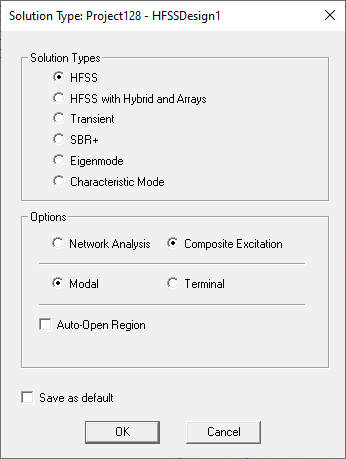
For Driven Model and Driven Terminal optoins, you provide a complete set of excitations before solving. Those excitations will be accessed via the Edit Sources dialog box, and the resulting excitation vector is passed to the solver. The solver will solve only that set of excitations, and will produce:
- a single field file representing the composite excitation
- a set of surface radiated field files
- a field header file
- a vector of Active S parameters
- the port impedances
- gamma
- the port field display files
Using the Edit Sources dialog, you define a set of excitations as input to the solver. The right-click menu on the selected excitation will bring up an Edit Sources dialog limited to display excitations to the selected excitation (voltage, current, terminal) or to the terminals and modes of a selected wave port. The right-click menu on the excitation folder in the project tree will bring up the full Edit Sources dialog box. Edit Sources is available from the Fields folder.
When the solution type is single excitation, the Edit Sources dialog will hide the total voltage and apply port post processing options - these are not supported in this mode. The buttons to load and store excitation vectors are fully supported.
In a single excitation problem:
- changes to the excitation vector are a major edit
- only design and project variables are permitted (no post process variables)
- entries in the excitation vector may be expressions
- the user can sweep those variables in Optimetrics and the reporter
- the excitation vector for each variation to be solved will be passed to the solver
- Total voltage and port post processing effects will be unavailable
- The excitation vector will be validated as part of the boundary module.
The Edit Sources dialog can show either the complete excitation vector or be limited to the vector for a single excitation. The latter functionality is available in the network versions of Driven Terminal, Driven Modal, and Transient.
The Load and Save functions in Edit Sources will be available in both network and non-network.
The solver will produce a single field file for each solved variation. This field file (and its header) will occupy the same directory structure as was used for network solutions.
The solver will produce a single vector of Active S parameters. That data will occupy a single column of the network data solution which would have been produced by a network solve. The network data will include port Zo and gamma.
Field reports and field overlays will be available as in a Network Analysis solution.
- Edit Sources is a major edit. So, it will invalidate all plots.
- Port renormalization, deembedding, and lumped port calibration are also major edits
- Animation of major intrisics (frequency) or design variables is supported.
- Field reports using post process variables (for example, to move a non-model point through the design) are supported.
Port field displays are supported as for Network Analysis. That is, port fields represent a uniform excitation at each port, NOT for the excitations specified by the user in Edit Sources. The reason is that we still need to solve the ports individually (even non-excited ports) before applying the user excitations.
For Composite Excitation Solution types:
- Differential pairs are not supported.
- Derivatives are not supported.
- The reporter cannot display S parameters or any data derived from them (Y, Z, …).
- Gamma, terminal (and modal) port impedance will be available. The Matrix display panel will be limited to Gamma and port impedances. There will be no touchstone export.
- The reporter can plot fields as well as Active S (and Active Y, etc.). However, the Active S is provided by the solver, rather than by post processing. Active Y, Z and VSWR are functions of Active S and port Zo.
- Radiated fields are supported.