
3D Modeler Options: Discovery Link Options
Under 3D Modeler options, Discovery Link options determine how linked Discovery projects are imported.
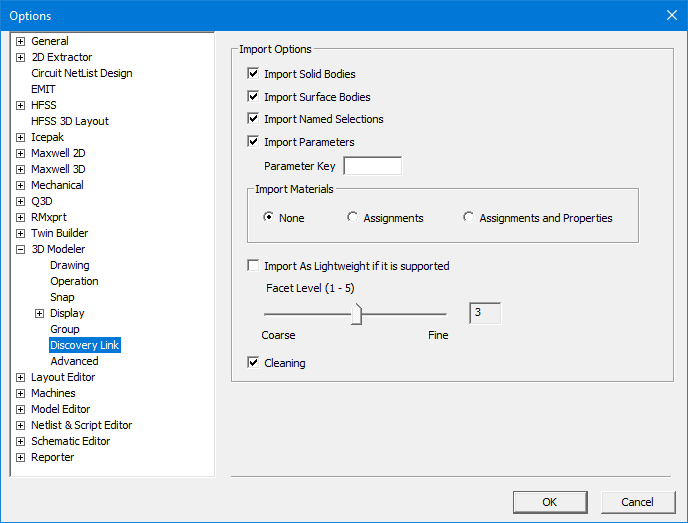
To specify Discovery link settings, select or clear the following check boxes in the Discovery Link section:
- Import Solid Bodies – Enabled by default.
- Import Surface Bodies – Enabled by default.
- Import Named Selections – Import groups of entities. For example, faces can be grouped and named in Discovery, and if this option is checked, the named selections will be preserved during import and listed in the 3D Modeler history tree under a Named Selections branch.
- Import Parameters – Enabled by default.
- Parameter Key – A string used to filter out parameters. By default, no string is entered and all Discovery parameters are imported.
- Import Material Assignments – None by default.
- Assignments – Imports the material names without the material properties. The material properties will be obtained from a material with the same name that exists in the user's project. With this option, the system will first search for the material within the project's materials. If no matching material is found, the search will extend to the sys libraries. (See Working with Material Libraries for details on libraries.) If a material with the same name exists in a sys library, it will be imported into the project from the library. If a material with the same name cannot be found in the project, a violation will be issued after the Discovery link is created.
- Assignments and properties – Imports material with its material properties. A project material will be created in AEDT with imported properties. Note that if a project material with same name already exists, then it will be used instead of a new material being created.
- Import As Lightweight if it is supported – This feature allows you to import a geometry from Discovery as a lightweight geometry into a design with SBR+ solution type. The Facet Level can be set on a 1-5 range, from coarse to fine, if the geometry in Discovery is not faceted. If it is faceted in Discovery, the facets will be imported directly and the Facet Level setting will be ignored.
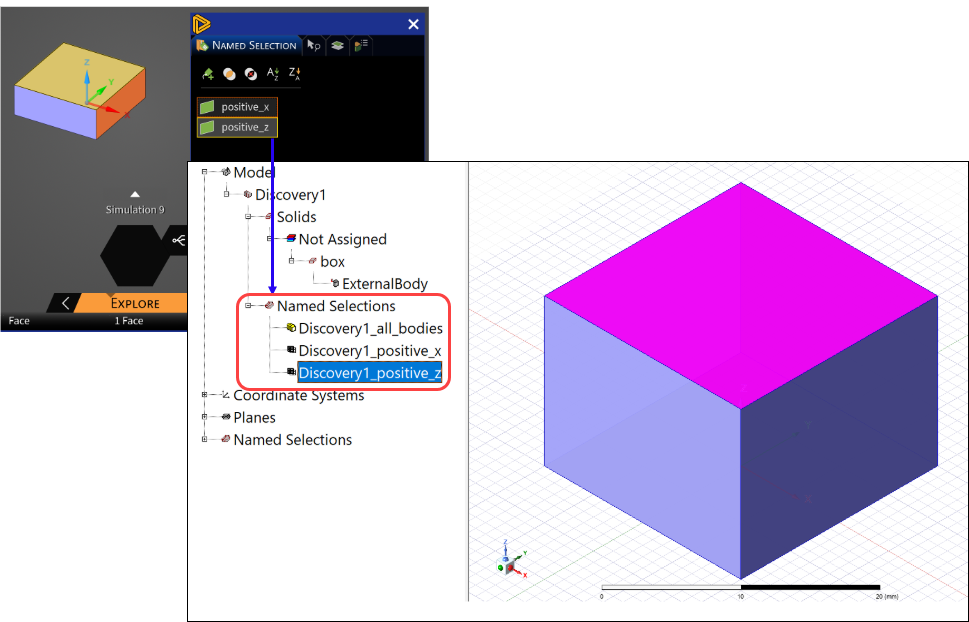
Tip: Named selections can be used to preserve entity IDs during parametric variations. See 3D Modeler Discovery Link for more details.
Note: Discovery currently only supports exporting mechanical and thermal properties, so the Assignment with properties option is only supported in Mechanical and Icepak designs. For HFSS, Maxwell, and Q3D designs, this option will be ignored.