
Selecting Non-Model Drawing Mode
To switch to non-model drawing mode:
- Click Modeler > New Object Type> Non Model.
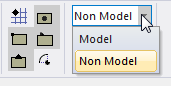
Alternatively, on the Draw ribbon tab, choose Non Model from the Set to model non model type drop-down menu:
- Draw the object.