Meshing Method
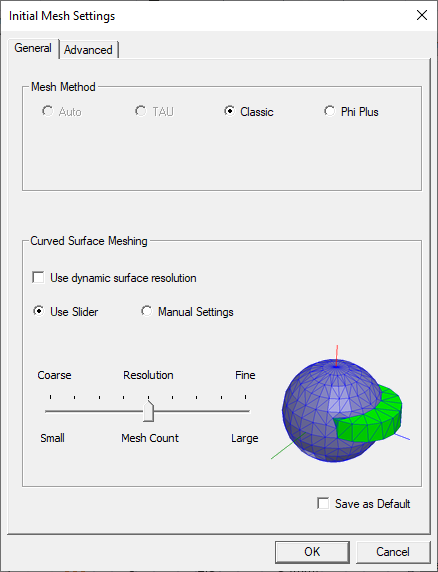
HFSS has four meshers available to generate the initial
mesh:
The Auto selection automatically chooses a suitable mesh method for the design based on geometry characteristics (e.g., if the design contains bondwires, Phi Plus is selected).
The Tau mesher produces very high quality meshes. It uses a volume decomposition method to create the initial mesh and coarsens it to achieve small element count. It has the ability to adaptively relax the tolerance to overcome the inaccuracies and misalignments in the input model. This mode of operation is called the Tau tolerant. The other version is called Tau strict.
Both meshers are designed to handle all geometries. However, if you select Auto, HFSS picks either the Classic or Tau mesher based on the analysis of the geometry. You can override the selection and choose either Classic or Tau to make the initial mesh. Depending on the model, sometimes Classic converges with fewer resources whereas Taumay converge faster. Whichever mesh is selected, the converged results are accurate. Ansys recommends selecting Auto since HFSS automatically determines the correct choice of the mesher for a given geometry.
The consolidation of surfaces into a conformal mesh is skipped for dynamic and tolerant meshing, including for light weight geometries. This can lead to overlapping surfaces in SBR+ simulations. The user should carefully avoid overlapping surfaces or objects as SBR+ can produce unexpected results.
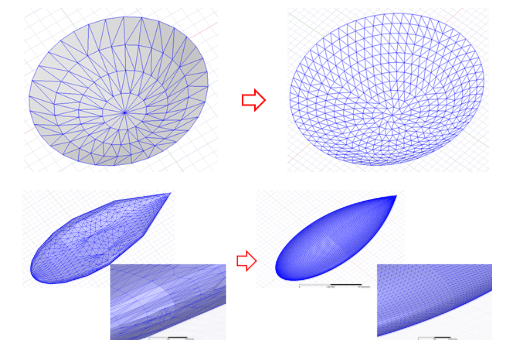
If the model contains IE Regions, the Tau mesher uses a surface mesh routine to detect which curve faces should be remeshed, rather than using the faceting triangles. This produces a high quality mesh, uniform, including the top, sides and bottom. (See the following figure for examples of the benefit.) Other faces that cannot be remeshed still get faceting triangles. In the final output, the remeshed surface mesh and faceting surface mesh are coupled to ensure the mesh is watertight and conformal.