
Deembedding the Tuning Ports
HFSS and HFSS 3D Layout ports contain potential parasitic effects that have an option be removed by the port deembedding selection. This selection assumes widely separated ports, and will not produce useful results for closely spaced ports used for Automated Port Tuning. Consequently, the interactions between the closely spaced ports must be deembedded externally on the tuning port schematic. FilterSolutions provides an approximate deembedding solution of inserting a negative length micro strip or strip line in series with the port elements and of default length -0.7 times the length of the tuning port gap. Since there is no "One Size Fits All" solution to the closely spaced dual port problem, a tuning variable, "Kdbed" is created in the tuning port schematic parameters that may be used to fine tune this value between a range of 0 and 2.0 to adjust the length of the deembedding micro strip or strip line for the most accurate setting.
Horizontal ports require slightly more deembedding, and are bumped up by a default factor of 1.3, which my be manually adjusted further by the designer.
Figure 1 shows the Kdbed deembedding tuning parameter in the Desktop tuning tool. If the tuning port schematic simulation is compared directly to the HFSS or HFSS 3D Layout simulation, sliding the Kdbed variable up and down will move the tuning port schemtic simulation up and down in frequency. Set Kdbed to the value that produces the best match between the two simulation traces.
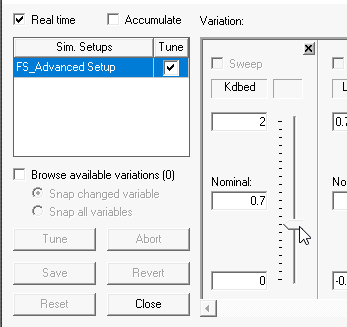
Figure 1: Tuning the Port Deembedding Constant