
Spurious Responses
Non-harmonic spurious responses (spurs) can be added to a Rx Spectral Profile by adding a Spurious Responses node. Any number of spurs can be added in the table appearing in the Spurious Responses property panel. There are two types of spurs available: Fixed and Relative. Fixed spurs are at the same frequency for all channels in the band. Relative spurs are specified as a function of the channel frequency. Spurious Responses are defined by their frequency, bandwidth, and power (susceptibility).
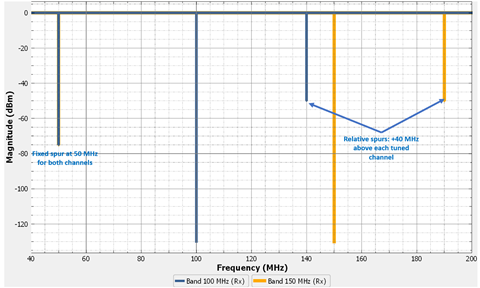
When entering data for the frequency of a receiver spur in the Spurious Responses table, the frequency can be a fixed number or it can be an expression defined with respect to the channel frequency. To enter a fixed frequency, simply enter a number in the Frequency field. For a spur relative to the channel (RF) frequency, an expression can be entered into the Frequency field. In the example shown below, there are two spurs defined. The first is at a fixed frequency of 50 MHz with a bandwidth of 20 kHz and amplitude of -75 dBm. The second is a relative spur that is located 40 MHz above the channel frequency. This 40 MHz offset is maintained for all channels in the Band, while the fixed spur remains at 50 MHz for all channels.
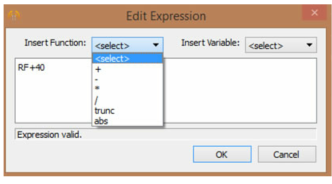
When you click on the Frequency field in the Spurious Response table, you can enter a number (for a fixed spur) or a mathematical expression involving numbers and the variable "RF" (representing the tuned channel frequency). By pressing the button, you can access the Expression Editor for creating expressions.
The tables can be populated manually by adding rows and typing in the desired information or the data can be imported via an external CSV file. The power can be entered in either absolute or relative units (relative to the tuned channel's peak power) as defined by the Spur Table Units parameter.
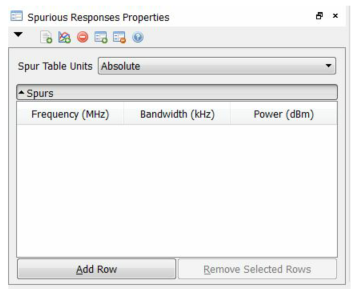
Spur Table Units: Specifies the units used for the power level defined in the table. The power can be entered in either absolute power or as a power level relative to the tuned channel's "peak" susceptibility.
Add Row: Add a row to the table.
Remove Selected Rows: Delete the selected rows from the table.