
Antenna Passbands
Antenna Passbands are added to EMIT from the Coupling Editor. Antenna passbands are used to add frequency dependence to EMIT's parametric antenna models. They enable users to specify the operational frequency band(s) of an antenna. For example, an isotropic antenna with 0 dBi gain can be created in EMIT. This antenna initially has 0 dBi gain for all frequencies. By creating two passbands with the profiles below, this isotropic antenna can function as a dual band antenna.
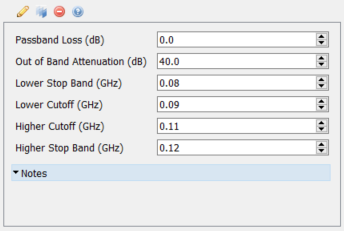
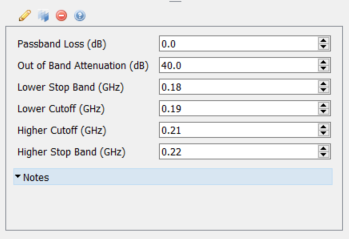
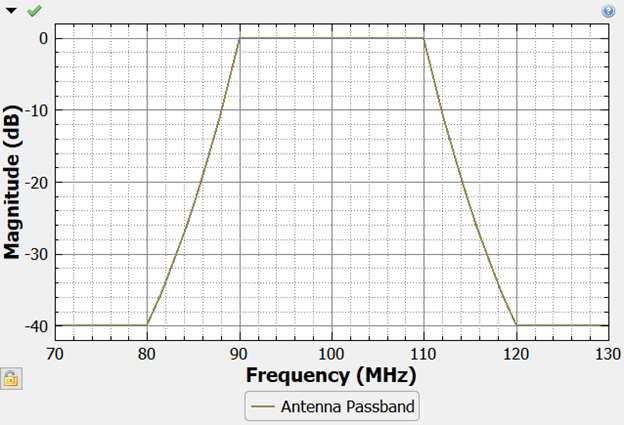
The dual band isotropic antenna now has a peak gain of 0 dBi in each of the bands specified (90-110 MHz and 190-210 MHz). At frequencies outside of these two bands, the antenna has a gain of -40 dBi. In general, to determine the gain of an antenna with passbands at each angle for all frequencies, one needs to determine the gain at the desired theta/phi as determined by the antenna radiation pattern and then combine this gain with the magnitude of the passband at the desired frequency. To illustrate this, let's continue with the previous example of a 0 dBi isotropic antenna and determine its gain at 115 MHz and directly at the horizon (theta = 0 deg, phi = 0 deg). An isotropic antenna in EMIT has a constant gain at all angles and so in this specific case the gain at 0 degrees theta, 0 degrees phi is 0 dBi. In the passband plot below, one sees that at 115 MHz the passband has a magnitude of -20 dB. Therefore, this isotropic antenna would have a gain of -20 dBi at 115 MHz when viewed at the horizon.
Each Antenna Passband has the following properties defined in the Properties window:
Passband Loss [dB]: The "in-band" loss of the antenna passband. This is similar to the insertion loss of a filter. For multi-band antennas, the peak gain within each band often varies and this provides one way to model that variation.
Out of Band Attenuation [dB]: The attenuation of the passband at out-of-band frequencies (that is, below the Lower Stop Band and above the Higher Stop Band).
Lower Stop Band Frequency: The maximum frequency of the lower stop band. All frequencies below the lower stop band are attenuated by an amount equal to the out of band attenuation.
Lower Cutoff Frequency: The lower cutoff defines the minimum frequency of the antenna's passband. All frequencies between the lower cutoff and the higher cutoff are attenuated by an amount equal to the Passband Loss.
Higher Cutoff Frequency: The higher cutoff defines the maximum frequency of the antenna's passband. All frequencies between the lower cutoff and the higher cutoff are attenuated by an amount equal to the Passband Loss.
Higher Stop Band Frequency: The higher stop band defines the minimum frequency of the higher stop band. All frequencies greater than the higher stop band are attenuated by an amount equal to the out of band attenuation.
See the Plotting Composite Passbands information on the Antennas page if you want to plot multiple passbands in an overlay.