
Resetting the Feedback Iterator
Resetting the iterator essentially means starting from iteration-0 conditions, that is:
- No Displacement or Temperature feedback from another system is incorporated.
- The first iteration solution will be purely an Ansys EM analysis solution.
Resetting the Feedback Iterator cannot easily be done entirely within the Workbench application. However, the following two processes can be used:
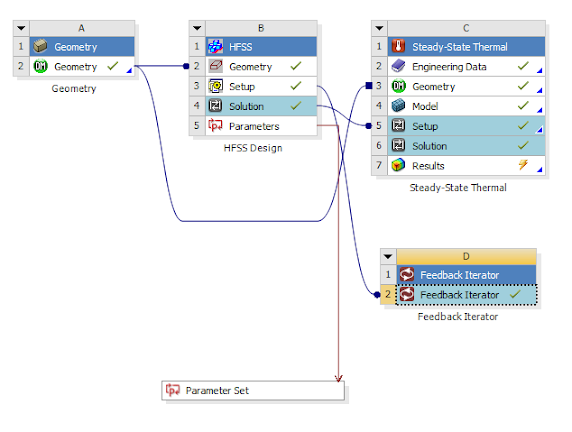
The following example uses an HFSS/Thermal project. (This same approach applies to the other Ansys EM design types.)
Resetting via the Ansys EM User Interface
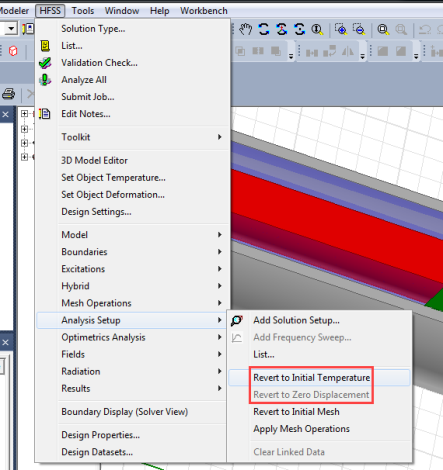
Depending on the type(s) of feedback involved, this typically means reverting to initial conditions for one or both of the following settings:
- Revert to Initial Temperature
- Revert to Zero Displacement
You can find these under the respective design type menu, such as the HFSS menu shown below.
Resetting via a Workbench Journal Script
You also can build a script from scratch using the following as the template – simply update the system name as appropriate, include the appropriate "Revert..." commands, and either save as a script or enter into the Workbench Command window.
oDesign = Ansoft.GetDesign(GetSystem(Name="HFSS"))
oDesign.GetModule("AnalysisSetup").RevertAllToInitialTemperature()
oDesign.GetModule("AnalysisSetup").RevertAllToZeroDisplacement()