
Integrating Ansys EM Suite with Ansys Workbench
You can integrate the Ansys Electromagnetics Suite with the Ansys Workbench application after both have been installed on your system. For successful integration, both preinstalled applications must be of the same version. A single operation completes the integration process for all supported design types.
The same procedure is used to integrate the applications or to decouple them (if they had previously been integrated). The procedure is as follows:
- From the Windows Start Menu, select All Programs > Ansys EM Suite 20yy Rn > Modify Integration with Ansys 20yy Rn.
- If both applications are present on the system, their installation paths will be reported, and you will be asked if you wish to integrate them.
- Alternatively, if integration has already been performed, you will be asked if you wish to decouple them.
- Type yes to perform the prompted action or no to abort the operation without making any changes. Then press Enter
- If you enter "yes," a confirmation line appears in the command window indicating that integration (or decoupling) has been completed, and the window remains open.
- If you enter "no," the operation aborts and the command window closes immediately.
A Modify Integration with Ansys 20yy Rn command window appears.
Press Enter again to close the command window.
You can confirm that the Ansys 20yy Rn application is “aware” of the integrated application via the Options dialog box in Workbench. The path to the integrated Electronics Desktop application is listed in the Electromagnetics group of settings.
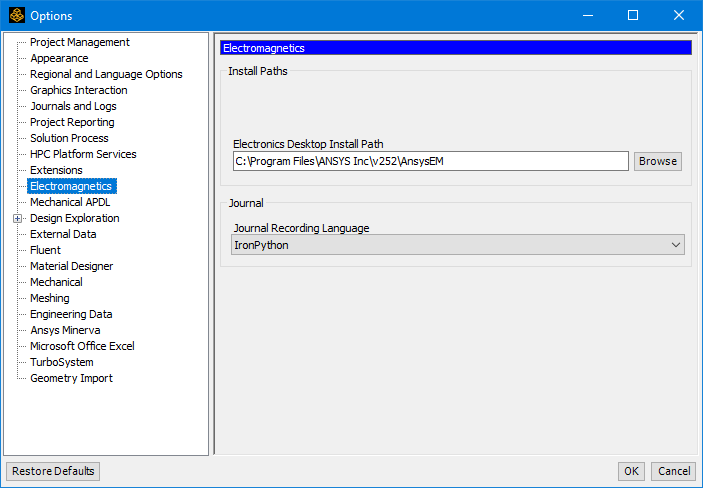
In this group of options, you can also specify Workbench's default Journal Recording Language for use when interoperating with the Ansys Electromagnetics products. Iron Python is the default language, and the alternative choice is Visual Basic (VB). Changes applied here affect any new Workbench or Ansys Electronics Desktop session launched after the change. Any open instance will continue recording in the language that was in effect when the program was launched.