
Net and Bus Auto-Naming
Selected wires can be named as a group with either bus-style names or net-style names (A[0], W1) using the Auto-Name Wires window.
To name wires as a group:
- In the Schematic Editor, select the wires to be auto-named.
- Click Schematic in the menu and select Auto-Name Wires to open the Auto-Name Wires window.
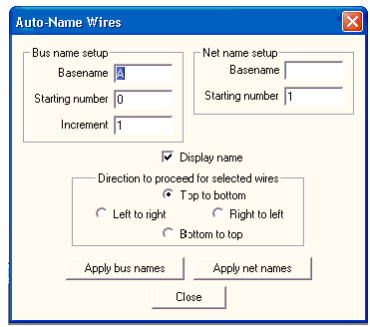
- Adjust the Bus name setup or Net name setup, depending on which naming style you want to use.
- Toggle Display name off if you do not want the wire names to display on the schematic.
- Select the direction for applying the names to the selected wires.
- Click Apply bus names and Apply net names to set the names of the selected wires.
Click Close to close the window.