
Drawing Bus Entry Objects
The Draw>Bus Entry object menu command provides the user a way to add visual representations of connections from a bus to an individual net or a sub-bus.
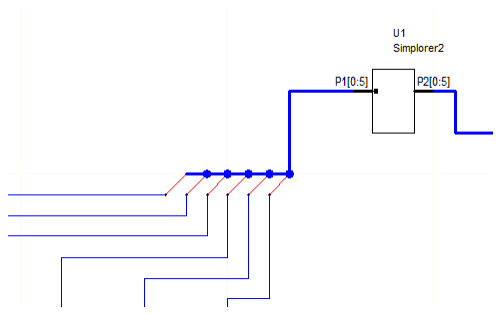
On a schematic, a bus may be shown with individual nets (wire) or with wires where the bus width is greater than 1 (drawn with a thick blue line). The Bus Entry object provides a mechanism for visually representing individual wires connected to a bus consisting of multiple nets as shown in the following example. In this example, the P1[0:5] bus is visually “connected” to individual wires via the bus entry objects (the diagonal red lines).
Note:
- Bus Entry objects provide only a visual representation of connections on the schematic - not actual connections. The user still must ensure that connectivity is maintained by properly naming the wire segments drawn out of a bus.
- Because they are merely visual representations of connections, Bus Entry objects have no significance or effect on the actual circuit, and thus do not appear in the net list or in any results.
- Bus Entry objects can be used to show connections to nets of any width and any domain.
- Both ends can only be attached to nets and cannot be directly attached to other pins or ports.
- If the wires on each end of the Bus Entry are not correctly named to show that they are connected, then Disconnects are drawn.
To add bus entry objects to an existing schematic:
- Add a bus to the schematic by drawing a wire and naming it as a bus. For example: DataBus[0:2].
- Place a Bus Entry on the Draw menu such that one end intersects the bus.
- Draw another wire on the other end of the Bus Entry object.
- Rename this new wire as DataBus[0] to use that element of the bus as the individual net.
- Repeat as needed for the remaining bus elements.