
Analyzing AMI Models with VerifEye
Instead of using the AMI_GetWave() data to create a time-domain waveform, use VerifEye to generate the impulse response on the channel parameters and apply the modifications in the AMI_Init() functions from both transmitter and receiver. Analysis with VerifEye is equivalent to the Statistical Simulation described in the IBIS AMI specification.
When used with AMI, VerifEye uses only the AMI_Init() functions. The AMI_GetWave() function is ignored. VerifEye is more accurate than standard AMI analysis, but computes only the linear part of the model’s behavior. VerifEye analysis assumes that incoming 0 and 1 bits are independent and occur with equal probability 0.5.
The VerifEye setup and run is the same as for standard VerifEye analysis. See VerifEye and Quick Eye Analyses for further information.
Three kinds of VerifEye reports are available: step response, contour plot, and bathtub curve.
Here is an example of a step response report:
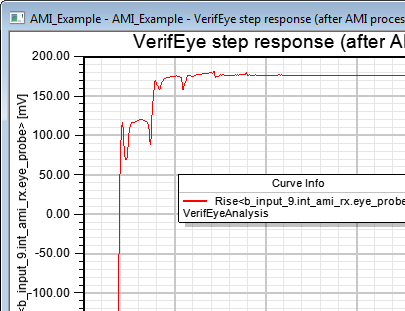
View the initial and final impulse responses in AMI analysis . With VerifEye see only the final step response (after the AMI_Init() functions have been applied).
Here is an example of a contour plot:
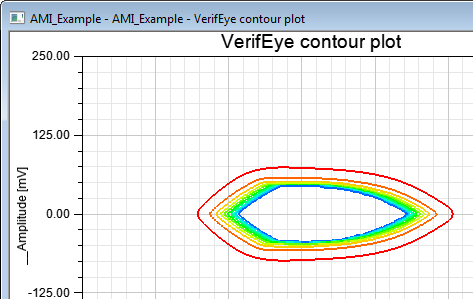
The VerifEye contour plot is always centered around 0.5 of the UI, while the AMI transient eye takes into account the actual phase shift of the signal.
Here is an example of a bathtub plot using the <Bit Error Rate> trace.:
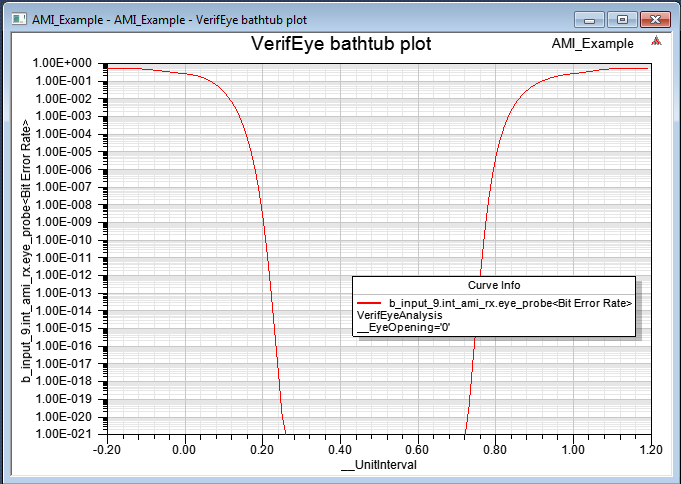
The bathtub curve for a PAM4 simulation can show the symbol error rate instead of the bit error rate. With PAM4, a symbol is two bits. The report setup is the same, but now select the <Symbol Error Rate> trace.