
AMI Bathtub Charts
The AMI bathtub report can illustrate curves of the Bit Error Rate (BER) at four points in the circuit:
- The Initial Waveform shows the Piecewise Linear data input to the transmitter, including any jitter.
- The Waveform After Source shows the output on the transmitter.
- The Waveform After Channel shows the input to the receiver.
- The Waveform After Probe shows the output on the receiver.
Note: With AMI plots, when Bathtub curves can be plotted and txrj is present, a warning message is displayed if the number of bits is less than 2.5e5.
To plot the bathtub diagram:
- Select Create Standard Report>Rectangular Plot.
- Select the following:
- Solution: AMI Analysis
- Domain: UI
- Quantity: InitialEye, EyeAfterSource, EyeAfterChannel, or EyeAfterProbe
- Primary Sweep: _UnitInterval
- Function: <none>
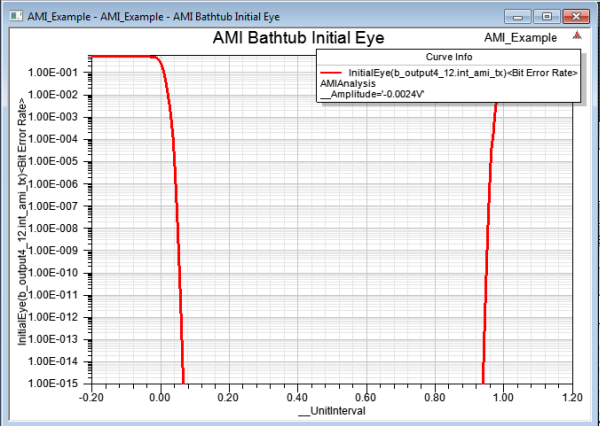
The following chart shows the BER bathtub curve for the Initial Eye waveform. From the Y-Axis, the Scaling is set to Log, with Max 0.6 and Min 1e-15.
-
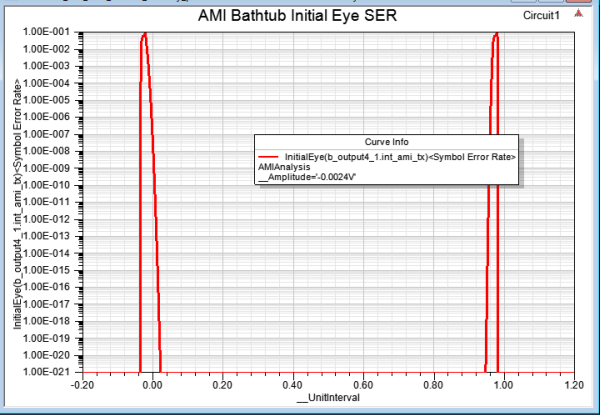
With modulation=PAM4, plot the symbol error rate. PAM4 symbols are two bits. Click the same Report setup, but select the <Symbol Error Rate> trace.
For bathtub curves of AMI, distinguish simulated and extrapolated regions with a partitioning horizontal line using the ‘SimulatedLimit’ option that is in the ‘Quantity’ column. For more information, please see Display Quick Eye Analysis Outputs.