
IBIS I/O Wizard Source/Analysis Setup
To configure source assignments, click Setup Sources/Analysis in the I/O Wizard window; this opens the Setup Source/Analysis window for the pins designated as “Signal”.
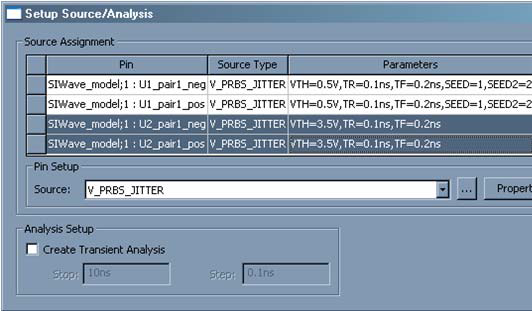
This window allows users to add sources to the project. Sources are connected to the selected drivers that have been configured for each of the signal pins. A transient analysis can also be set up, which streamlines the process. The fields in the window reflect customizations made to the Sources/Probe pin which allows for toggling the existence of a probe for the IBIS buffer.
- By default, a PRBS source with jitter is assigned to each signal pin. Sources are attached to the logic pin on the IBIS buffer (if applicable), not the actual signal pin. The Source selection box lists only the independent sources in the project. Grounds are automatically added to the other side of the source.
Click the [...] button to load another source , then click Properties to set the per-instance properties for the source. Checking the Probe box attaches a probe directly to the selected pin.
From the Analysis Setup area, set up a quick transient analysis by checking Create Transient Analysis, which enables the Stop and Step group boxes for controlling the analysis. After the window is closed, the setup can be further refined on the Project Tree.
Click OK to close the window and implement any changes that have been configured.