
Compressing Primitives in the Layout Editor (IC Mode Only)
Compressing primitives into collections reduces redundancy, optimizes memory, and improves performance by minimizing the number of unique entities that must be stored and processed. Primitives must be geometrically identical rectangles, circles, or convex polygons on the same net, and cannot contain any of the following features:
-
Holes or other complex features
-
Modeling properties or specific parameters
-
Pins or electrical connections
-
Membership in any via groups
Primitives created by GDSII import are automatically compressed, as evidenced in the Message Manager window.
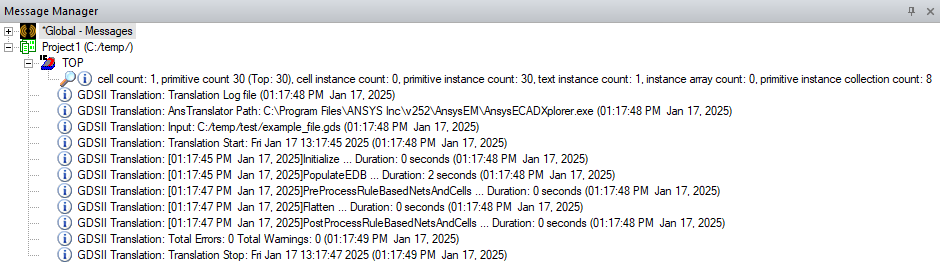
Follow these steps to compress primitives.
-
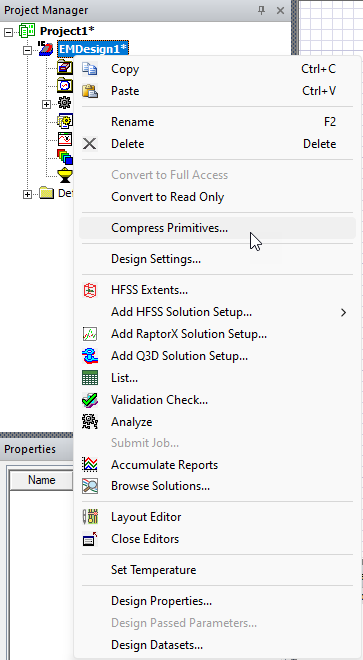
From the Project Manager window, expand the Project Tree (e.g., Project1) and right-click the HFSS 3D Layout design (e.g., EMDesign1). Then click Compress Primitives.
-
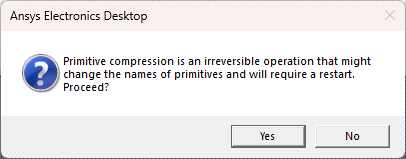
Two consecutive prompts will appear. The first warns users that primitive compression is an irreversible operation that may change the names of primitives, and that a restart is required to see an immediate performance improvement. Click Yes to compress primitives and continue to the next prompt.
-
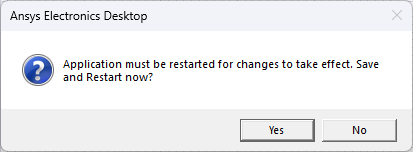
Click Yes to automatically save changes and restart immediately.
-
After the software restarts, reopen the project file. The Message Manager window will display evidence of the compression, including a count of affected elements, including the number of primitive instance collections (e.g., 2).
