Open topic with navigation
Defining VHDL-AMS DC Machine Values
- Open the VHDL-AMS DC machine Properties dialog box.
- On the Parameter
Values tab, change InstanceName
to DCM, la
(Armature Inductance) to 9.5 mH,
ke (Back EMF Constant) to 0.544 Wb, and j
(Moment of Inertia) to 0.004 kgm2.
- On the Quantities
tab, change ra (Armature Resistance)
to 1.2 ohm. For the load (Load Torque) property, type LOAD.VAL in its Value field to “connect” it to the LOAD characteristic component.
- On the Property
Displays tab add this property and visibility settings:
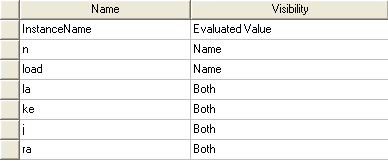
- Click OK
to apply the changes.
- Open the Properties
dialog box of Gain block N. Override the default INPUTValue by entering DCM.n to connect it to the
VHDL-AMS motor speed property.
Twin Builder 2025 R1 - © ANSYS, Inc. All rights reserved. - Contains proprietary and confidential information of ANSYS, Inc. and its subsidiaries and affiliates.
