
VHDL-AMS Edit Model Dialog Box
The Edit Model dialog box displays a tree view of a model’s editable objects in its left panel. The area to the right of the tree view displays the editing options for the object currently selected in the tree view.
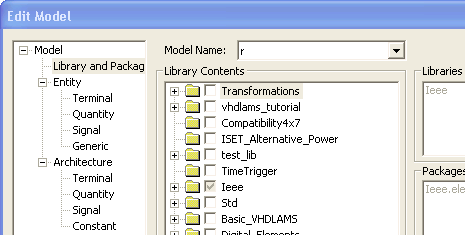
The editable content for each of the tree objects is as follows:
- Library and Packages – Choose the libraries, packages, and models used in the selected model.
- Entity – Rename a model entity.
- Entity > Terminal – Add, delete, and edit the Name, Nature (such as electrical and magnetic), and Description of terminal ports for the selected model entity.
- Entity > Quantity – Add, delete, and edit the Name, Type (such as capacitance, and voltage), Value, Direction (In or Out), and Description of quantity ports for the selected model entity.
- Entity > Signal – Add, delete, and edit the Name, Type (such as capacitance and voltage), Value, Direction (In, Out, or InOut), and Description of signal ports for the selected model entity.
- Entity > Generic – Add, delete, and edit the Name, Type (such as capacitance and voltage), Value, and Description of generics for the selected model entity.
- Architecture – Add, delete, and rename model architectures.
- Architecture > Terminal – Add, delete, and edit the Name, Nature (such as electrical and magnetic), and Description of terminal ports for the selected model architecture.
- Architecture > Quantity – Add, delete, and edit the Name, Category (free, across, or through), Type (such as capacitance and voltage), Value, Direction (In or Out), and Description of quantity ports for the selected model architecture.
- Architecture > Signal – Add, delete, and edit the Name, Type (such as capacitance and voltage), Value, Direction (In, Out, or InOut), and Description of signal ports for the selected model architecture.
- Architecture > Constant – Add, delete, and edit the Name, Type (such as capacitance and voltage), Value, and Description of constants for the selected model architecture.