
The Search Tab
Use the Search tab to enter full or partial words (case-insensitive) present in the names or descriptions of components in the search field. The search is done dynamically as you type. You can select the specific categories and libraries you want to include in the search. Use the Ctrl key to select multiple categories or libraries.
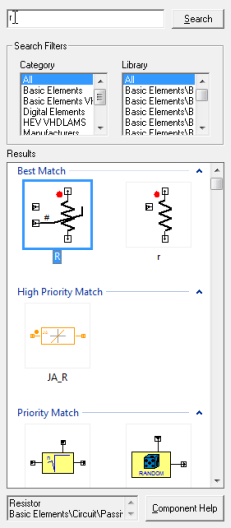
Results appear as symbols arranged in groups. Components which match the search string exactly appear in the Best Match group.
Select a component to see its description and library path in the text box at the bottom of the tab. Drag the desired component from the Results panel onto the schematic editor, or double-click it to attach it to the mouse. Click Component Helpto view the help for the selected component.