
The Pin List Dialog Box
The Pin List dialog box displays and sets values for the properties of symbol pins.
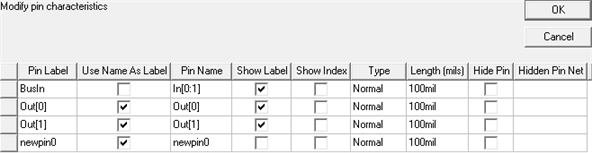
Pin properties include:
- Pin Label – Provides a field to add a user-defined label for the chosen pin on a component symbol without having to change the actual Pin Name associated with the chosen pin. Pin labels for pins in a component are unique.
To specify or change the label of a pin, click the Pin Label cell for that pin, type the name, and
- Press Enter, or
- Click in another cell.
Display the Pin Label for the chosen pin by clearing the Use Name As Label check box.
- Use Name As Label – Controls whether the Pin Name or Pin Label displays for the chosen pin when Show Label is enabled. For a new pin, Use Name As Label is selected by default.
- Pin Name – Sets the actual pin name. To
specify or change the name of a pin, click in the Pin Name cell
for that pin, type the name, and
- Press Enter, or
- Click in another cell.
- Show Label – Controls visibility of the either the Pin Name or Pin Label text for the pin (as determined by Use Name As Label). For a new pin, it is cleared by default.
- Show Index – Controls visibility of the pin number in the schematic editor. For a new pin, it is cleared by default.
- Type – Drop-down list sets the pin type. Options include Normal, ANSI In, ANSI Out, and Zero Length. To change a pin’s type, click in its Type cell and click the desired option.
- Length (mils) – Sets the length of the pin stem (the graphical line associated with the pin port symbol). By default, new pins have a pin stem length of 100 mils. To change the length of a pin, click its Length cell, type a new value, and either:
- Press Enter.
- Click in another cell.
- Hide Pin – Controls whether a pin is visible in the schematic editor. For new pins, it is cleared by default.
- Hidden Pin Net – Editable when Hide Pin is selected, specifies the net (circuit node) to which a pin will be connected if it is hidden. To specify a net, click in the Hidden Pin Net cell, type a net name, then
- Press Enter, or
- Click in another cell.