
Text Entry for Calc. Range or Edit Calculation Range Dialog
In the Setup Optimization dialog box, select a line item in the Cost Function field. To enter the Calc. Range Sweep Min/Max value, click the Calc. Range field and enter a value.

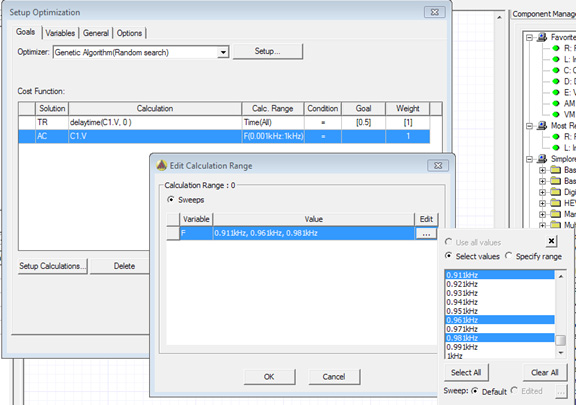
You can also use the Calc. Range drop-down list and select Edit. The Edit Calculation Range dialog box appears. Click  in this dialog box to specify a range.
The Calc. Range field accepts the following forms of text:
- sweep that lets you select different discrete
values:
discrete values, for example, F(10GHz, 11GHz)
min/max range, for example, F([10GHz, 11GHz])
- editable sweep, which lets you customize
values (that is, a sweep that has an enabled "edited" radio button in
sweep selection dialog box):
The min/max is used on top of selected values. For example, if you use the sweep dialog box and choose "0 deg, 60 deg, 180 deg, 240 deg", then [60deg, 240deg] will select values "60 deg, 180 deg, 240 deg".
- sweep that uses a full range:
all values, for example, Time(All)
min/max range, for example, Time([1ms, 2ms]) HFSS/MAXWELL/TWINBUILDER
- You solve 1 to 20 GHz step .1 and specify F[10.381GHz, 11.381GHz]: it is equivalent to selecting values between 10.4GHz and 11.3GHz.
- You can specify multiple sweep values by separating
those with a comma.
For example, F(1GHz), cap(1pf, 1.2pf)
For example, Distance(All), Freq([1ghz,2ghz]), Phase(0 deg)
Click Calc. Range > Edit
to open the Edit Calculation Range dialog box. Click and select Use
all values, Select values, or Specify range. The Select values option
is available depending on the solution type.
The image below shows how the range appears in the Calc. Range field when you specify a range.
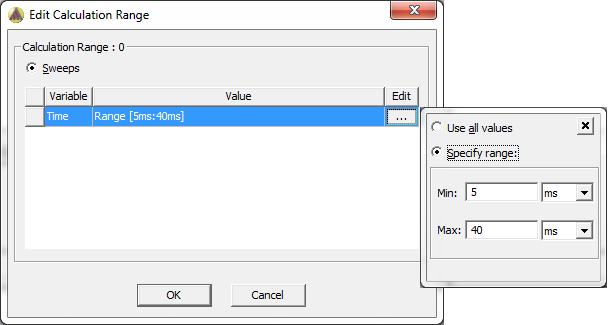
You can also enter a range directly into the Calc. Range field.