
Specifying Thermal Modifiers
To specify thermal modifiers for a material:
- In the View /
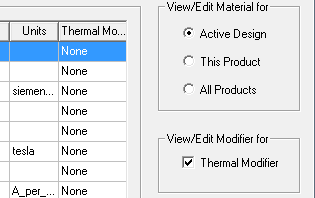
Edit Material dialog box, select the Thermal Modifier check box. The Thermal Modifier column appears in the Properties of the Material area.
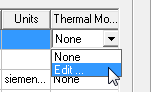
- Select Edit... from the drop-down list. The Edit Thermal Modifier
dialog box appears.
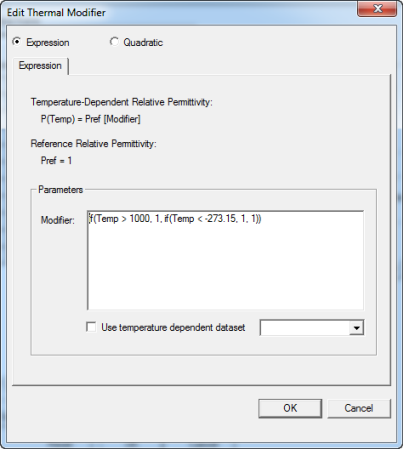
- Select the Expression radio button
to display the Parameters Modifier text field (as shown above) or the Quadratic
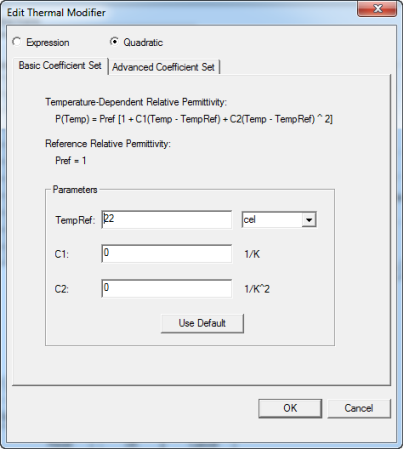
radio button to display the tabs for Basic Coefficient Set
and Advanced Coefficient Set (as shown below).
- With Expression selected, you can write an equation for a thermal modifier in the Parameters Modifier text field.
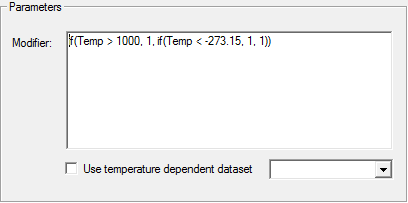
The expression whether to use Celsius or Kelvin is totally problem dependent. If a material thermal coefficient is defined as alpha/c_deg, then it is Celsius. On the other hand, if a material thermal coefficient is alpha/k_deg, then it is Kelvin.
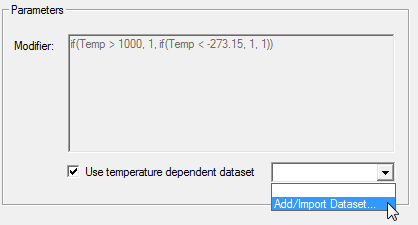
- Select the Use temperature dependent dataset
check box to disable the Modifier text field. Select Add/Import
Dataset from the drop-down list to define the thermal modifier as a dataset.
- Select the Quadratic radio button and click the Basic Coefficient tab. You can edit fields for the TempRef and units, and fields for C1 and C2 with this equation:
- P(Temp) = Pref[1+ C1(Temp - TempRef) + C2(Temp
- TempRef)^2]
where TempRef is 22 cel by default and Pref is the reference relative permittivity.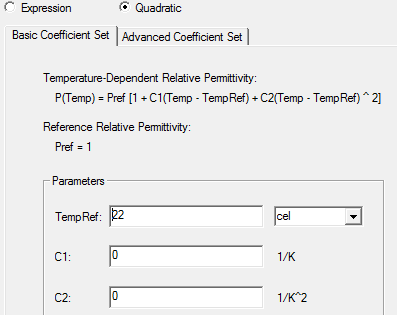 Note:
Note:The coefficients, C1 and C2, should be negative to yield physical results.
- Select the Quadratic radio button and click the Advanced Coefficient Set tab. You can edit fields for lower
and upper temperature limits (TL and TU respectively) and select their
units from the drop-down list.
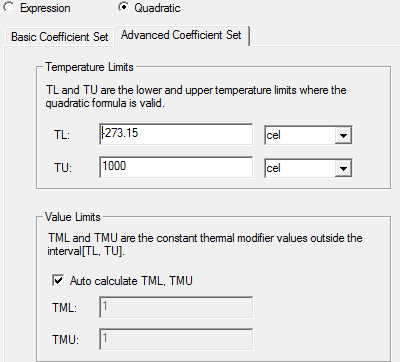
You can edit the constant value limit for the thermal modifier values outside the limits. By default, these are calculated. Clear the Auto Calculate TML, TMU check box to specify new values for thermal modifier lower (TML) and thermal modifier upper (TMU).
- Click OK to accept the edits and return to the View/ Edit materials dialog box.