
Setting Report Setup Options
To set report setup options in Twin Builder:
- Click Tools > Options > General Options > Reporter > Report Setup.
- Enter a number in the Maximum number of significant digits to be displayed when showing numerical quantities field.
- Specify the drag and drop behavior with one of the following options:
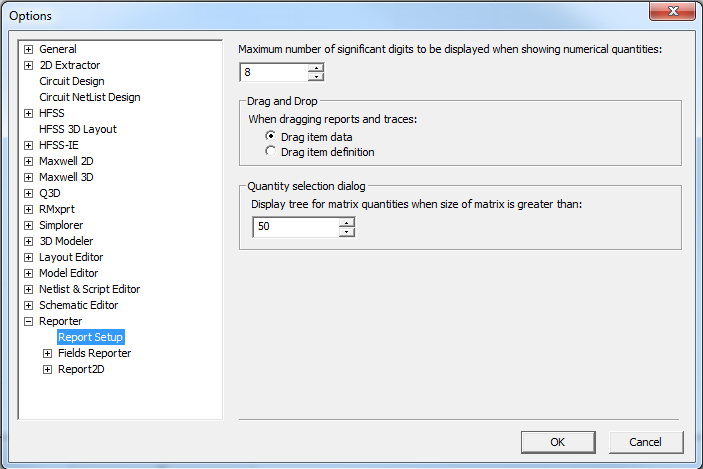
- Drag item data
- Drag item definition
-
The Quantity selection dialog box specifies the matrix size for using a tree display for matrix quantities in the Reporter dialog box. This is helpful when dealing with larger matrices. The default is 50. When the number of matrix elements is larger than the number, the Quantities field uses a tree structure to divide matrix quantities into groups by their first element name. The initial display shows groups, without initially listing the group members.
A folder node is not selectable. Click a folder node to expand or collapse it. When any of a folder's child nodes is selected, it becomes bolded.
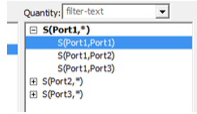
Click a quantity node (tree leaf node). Shift and Ctrl keys apply only to multiple selection dialog boxes:
- Without Shift and Ctrl key – Select the quantity and deselect all previous selected quantities.
- Only Ctrl key down – Toggle the selection of the quantity. No effect on other selected quantities.
- Only Shift key down – Do a range selection, and deselect any selected quantity that is outside of the range.
- Both Shift and Ctrl key down – Do a range selection, but don't deselect any selected quantity.
- Ctrl+a – Select all quantities in a multiple selections dialog box.
Range selection: Select quantity nodes between the last mouse clicked quantity node and the newly clicked on quantity node. Folder nodes in between won't be selected but their children are selected. Those folder nodes display as bold.