
Selecting Component Interface
Use the Select <model_name> Interface dialog box to choose interfaces to expose in Twin Builder.
You can edit a component interface for compiled Modelica models from the Schematic and Modelica model editors.
- Schematic – Right-click a Modelica component instance on schematic and select Edit Component Interface.
- Modelica model editor – Open the Modelica model editor menu and select Edit Component Interface.
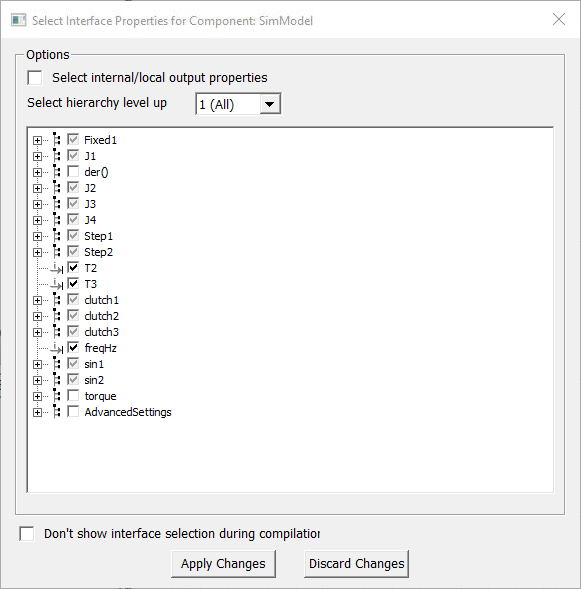
Select the desired model interfaces with these options:
- Select internal/local output properties – Include internal or local output properties in the model. Clear this check box to exclude these properties from selection.
- Select hierarchy level up to – Choose the desired hierarchy level from the drop-down menu. The value you choose selects input and output interfaces up to the chosen hierarchy level for inclusion in the model. The default value is 1. Hierarchy selections include:
 - Indicates an output. When selected, the property is added as an output in the component properties.
 - Indicates an input. When selected, the property is added as an input in the component properties.
 - Indicates a constant. When selected, the property is added as an output in the component properties. Constants are not selected by default. You must select them to expose them as component interfaces.
- Don't show interface selection during compilation – Select this check box to skip this step in future compilations. To reenable the step, open the Options dialog box, select Model Editor > Modelica > General, and select the Show model interfaces dialog during compilation check box.
Only the selected interfaces are added to the component; these interfaces are available for you to change/plot/monitor.
When the number of model interfaces is large, for better performance select only necessary inputs and outputs. Recompile the model to change above selection.
- Interface names that start with “_” are grouped under AdvancedSettings. Interface names that indicate derivative (der(<name>)) are grouped under der().
Click Apply Changes to finalize your selections and create/update the Twin Builder component with the selected interfaces. Click Discard Changes to ignore the current changes and use the default or previous interface selections.