
Recompiling, Encoding, and Licensing Libraries
If you make changes to binary model structure, dependent models or model libraries may need to be recompiled. You may also want to encode or license multiple libraries and/or packages. Twin Builder provides an automated way to manage these changes to model and package libraries.
- To recompile, encode, or license model
and/or package libraries, select Tools > Library
Tools > Manage Twin Builder Model Libraries.
The Manage Model/Package Libraries dialog box displays. The left panel is an expandable tree of all available model libraries and packages. Use the check boxes to select the libraries to change. Select a folder icon to select all libraries within the folder. Text appears below the left panel informing you of the number of models and packages currently selected. The right panel lists the elements in all selected libraries for informational purposes only.
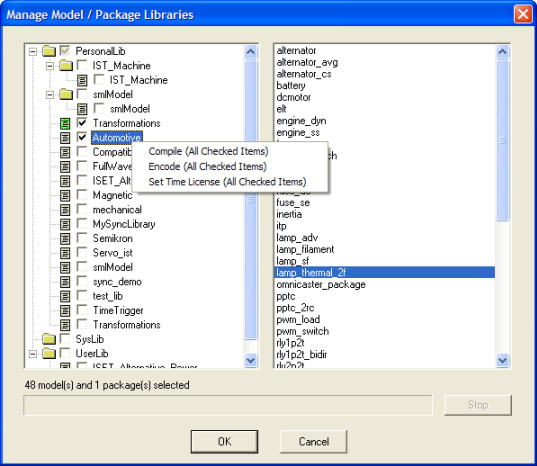
- Select the desired libraries and/or packages.
- Right-click in the library tree panel. A menu containing the following selections appears:
- Compile (All Checked Items)
- Encode (All Checked Items)
- Set Time
License (All Checked Items)
Note:
If none of the libraries is selected, right-click one to perform operations on it. The shortcut menu items contain the library name instead of All Checked Items.
- To compile the checked items, select
Compile (All Checked Items).
The progress bar below the library listing monitors the progress of the compilation. The original library and package files are saved with a .bak extension.
Click Stop during compilation to halt the process, leaving the libraries and packages in their original state.
- To encode or encrypt the checked items,
select Encode (All Checked Items).
The Encryption Settings dialog box appears. See Encryption Settings Dialog Box for details on encryption settings. Encryption of encoded items is not supported. Encoding encrypted items results in messages informing you that “The encode password has been removed.”
- To set a time license for the checked items, select Set Time License (All Checked Items). See Time License Settings for details.
- When finished, click OK to close the dialog box.