
Preparing a Project for Large Scale DSO Analysis
- Ensure that the Twin Builder project is on the shared drive.
- Set up a parametric table to use.
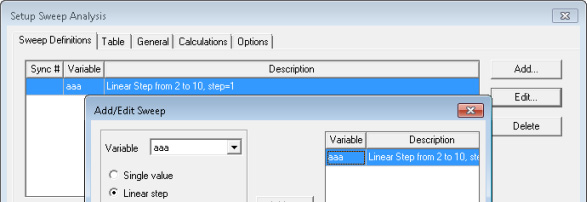
-
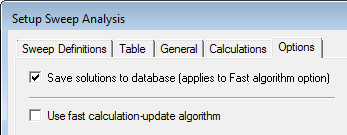
On the Options tab, select Save solutions to database, as shown below.
- Outputs from large scale DSO come from predefined rectangular plots that are created before the Analysis command is issued. Non-rectangular plots of the design (digital plots, for example) are not extracted. Follow the steps below:
- Use the Report window to define outputs for the desired rectangular plots.
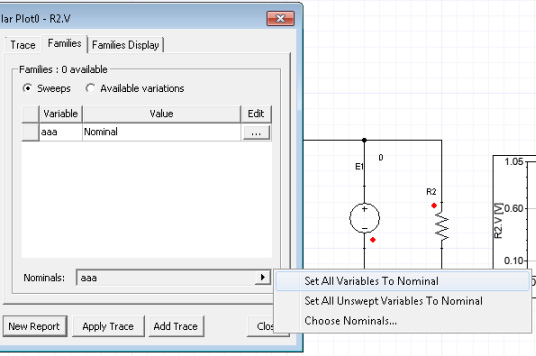
- Click the Families
tab and ensure that all variables are set to Nominal,
as shown below.
- Click New Report to create the report.
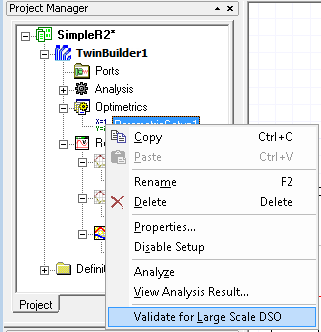
- Right-click the parametric sweep, and
select Validate for Large Scale DSO.
- A dialog box reports any errors. The following are some typical messages:
[error] Please remove all the calculations in Parametric Setup/Calculation page.
[error] No rectangular plot exist in the design. Please create a rectangular report.
[error] Report 'XY Plot 1' trace 'E1.I': please set all variables to nominal in Families tab.
[error] Please turn on "Save solutions to database" in Parametric Setup/Options page.
- Correct any errors, if necessary to pass validation.
- Save and close the project.