Options: Optimetrics Options
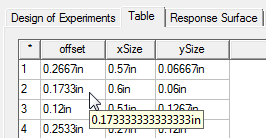
To set Optimetrics options, select Tools > Options > General Options to open the Options dialog box, then select Optimetrics. The Optimetrics options involve the maximum number of significant digits to be displayed when showing analysis results:
With variable values, if you have assigned more significant digits, you will see these when editing the variable value. With table displays of values, the tooltip display shows all available digits when the mouse pointer is over a result.