MDX File Format
You can convert most MDX and similar data files to datasets (see Importing Datasets). Project datasets are stored with the project, eliminating an external file reference. Project datasets used in designs represented by hierarchical components are saved to the library with the component and restored when you use the component (see Exporting Hierarchical Components).
The .mdx file format is a Twin Builder internal data format used to exchange data between the different programs. Create and edit the files with a text editor. The semicolon at the end of each dataset is essential, including the last one.
Data files in .mdx format are structured in a table-like fashion. The datasets are interpreted as a sequence of k-dimensional value tuples (ai,bi,ci,….) with a record length n (that is, data field/table of k columns multiplied by n rows). The correlated values of a k-tuple are arranged successively in the dataset:
In a typical case (time functions, characteristics) the first value in the n-tuple (ai) represents the common abscissa (“x”, time “t”…) where the datasets are in ascending order of ai ("x", "t", …).
Each file starts with header information for the data sets. The header always terminates with the “END:=” statement. All data within a line is separated by a semicolon; a line must be closed by a semicolon and CR/LF.
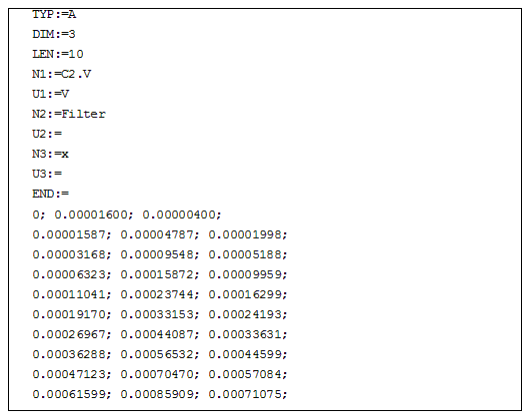
The specifications Nxx and Uxx for names and units of data channels are optional and can be omitted.
Data Set Parameters
The required parameters are (in this order):
|
TYP:= |
The data file type. • 4 4-Byte-Real data The datasets are read-only via the separate conversion program. • A ASCII data |
|
DIM:= |
Dimension n of the file (number of columns of the table). Usually in a simulation data file this corresponds to the number of data channels. |
|
LEN:= |
The number of data records (for ASCII files = number of rows). In a simulation data file, this is equal to the number of time steps calculated. |
|
END:= |
Close of data identification set. |
The optional parameters (in arbitrary sequence and selection) are:
|
SEP:= |
A separator between the single data values of ASCII sets. This specification is necessary only when selecting a separator different from the default semicolon character (";"). The separator may be enclosed by quotation marks (SEP:=/ or SEP:="/"). |
|
COD:= |
The kind of data (3 Characters). |
|
DAT |
Time domain data. |
|
NAM:= |
Data file name (max. 64 characters), for example, used for titles in graphics. |
|
USR:= |
User name (max. 64 characters allowed). |
|
NEW:= |
Date of creation (DD.MM.YY). |
|
MOD:= |
Date of latest modification. |
|
TIM:= |
Time of creation (HH:MM:SS). |
|
Nxx:= |
Name of the XXth quantity in the data record (the first 14 characters are valid in DAY); can be used, for example, for automatic axes labeling; XX = '01' … n (n - data set dimension); leading zeros must be specified for XX. |
|
Uxx:= |
Unit of the XXth quantity in the data record - analogous to 'nXX' (max. 6 characters valid); may be any valid unit string in Twin Builder. Values are internally converted to SI and scaled appropriately. |
|
Optional supplementary parameters, especially for measured transient recorder data: |
|
|
DX2:= |
2nd sampling rate when dual time base is used. |
|
The header is always terminated with “END:=”. |
|
Data Set Format
- n-dimensional value sets are possible. Each record containing n values must be positioned on one line (limited to 255 ASCII characters per record).
- The k values are separated by a separator character (also after the last value per line) usually the semicolon (;) - space characters are then ignored.
- All other special ASCII characters are also possible separators, except for the decimal point (.) and the space.
- If the separator is not the semicolon, the separator must be specified in the data set identification file as the SEP:= parameter, for example, SEP:="/".
- You can write the data in any standard number format used in data processing, such as: 10/ 10.0/ 1.0E1.
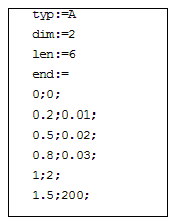
.mdx Files used for Components using 2D Characteristics
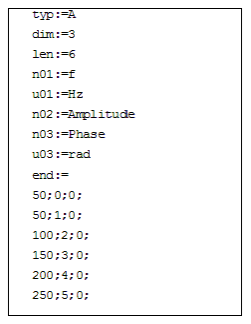
.mdx Files used for Fourier Sources
.mdx Files used for 3D Lookup Tables
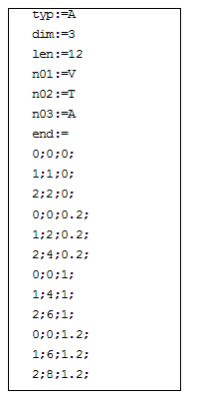
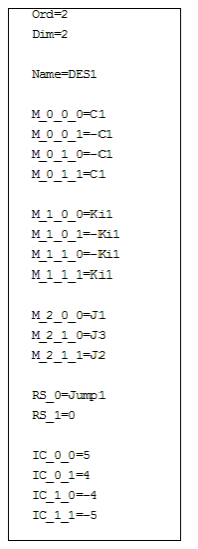
.mdx Files used for DES Models