
Import Data from Generic Text Files
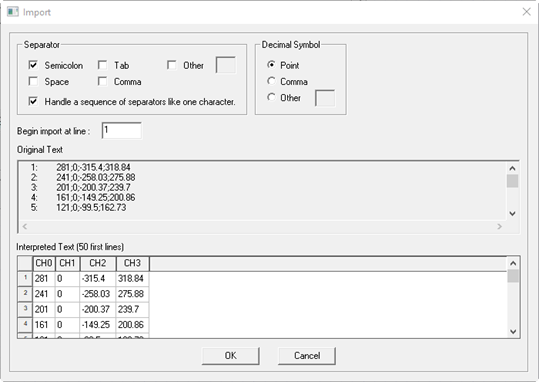
In this import data dialog box, you can specify settings for reading table data from a generic text for import (.txt, .dat, .out, or .csv ). You can choose the Separator and Decimal Symbol, as well as the line at which to begin the import. When importing simulation data, you can select the channels to import with the check boxes in the Select Channels combo box. The dialog box shows both the original text and the text as it would appear when imported based on the current import settings.
-
Separator – Choose the separation character between the data items. Depending on the file format and some initial scanning of the data, some separator will be pre-selected. After changing the setting for the separator, the data is re-scanned, and the preview updated.
-
Decimal Symbol – Choose the decimal character of the data items. The decimal character is chosen by default depending on the computer language, but it can be changed. After changing the setting for the decimal symbol, the data is re-scanned, and the preview updated.
-
Begin Import at Line – Set the line number at which the data is imported into the dataset. If the file contains one or more header lines, which may contain comments or additional information, those lines can be skipped. If the first line of a data file contains a header line with the names and possibly units of the data columns, the import tries to scan and use this data. If any specified data unit is not a base SI unit (for example, mV or kOhm) the data values will be converted into the base SI unit.
-
Original Text – Show the original text of the first 50 lines of the data file.
-
Interpreted Text – Shows a preview of the data for the first 50 lines as it would be imported.