
Going to a Numbered Line
Errors and warnings from the netlist parser refer to line numbers in the netlist. Line numbers display in the Netlist Editor by default, and you can move the cursor to a line by specifying its number. To move the cursor to a numbered line, select Edit > Go To Line or press Ctrl+G. Both operations open the Go To Line dialog box.
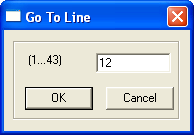
- The parenthesized display shows the range of available line numbers in the current netlist.
- Enter the number of the line and click
OK. The cursor moves to the beginning of that line.
Note:
Go To Line is also used by various other Twin Builder text editors such as the VHDL-AMS, Package, Script, C-Model, SPICE, and SML editors.