
General Options: Desktop Configuration
These options are set in the Desktop Configuration panel under General in the Options dialog box. Options affect the solver icons displayed in the Project menu for inserting designs. Some selections also affect the default appearance of the Import, Automation, and Definition toolbar menus. You can select the default project type, and whether a project is inserted. This lets you customize aspects of the Electronics Desktop configuration to focus on your work priorities.
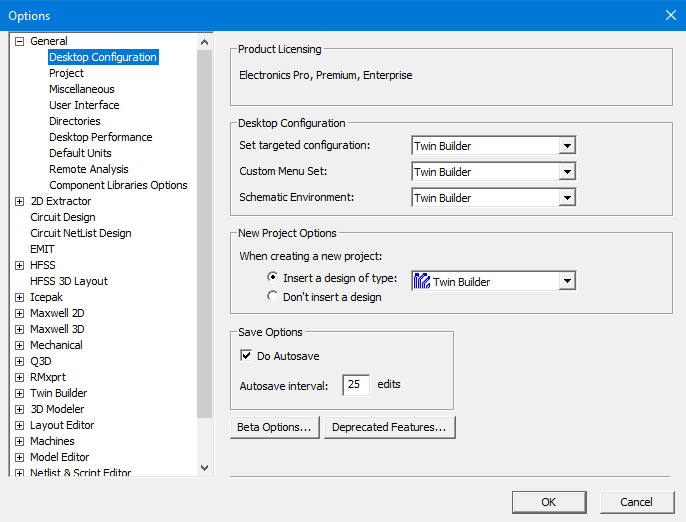
Product Licensing
Ansys Electronics Desktop now uses Electronics Pro, Premium, Enterprise (PPE) product licensing. Legacy product licensing and DSO are no longer supported.
With PPE, HPC licensing is used to enable all cores, GPUs, and distributed tasks.
Distributing Optimetrics Variations
Twin Builder distributes Optimetrics variations with Ansys HPC licenses.
Twin Builder also requires the on-demand model licenses for Modelica and Dynamic ROM model simulation.
Desktop Configuration
This section contains the following: Set targeted configuration, Custom Menu Set, and Schematic Environment.
-
Set targeted configuration Each selection here also affects the default selections for the Custom Menu Set and Schematic Environment options described below, as well as the default design type for a new project. Select the desired targeted configuration from the Set targeted configuration dropdown menu.
-
All – Set the Custom Menu Set to Default, the Schematic Environment to Circuit and the default design type for a new project to HFSS.
-
EM – Set the Custom Menu Set to EM, the Schematic Environment to nothing, and the default design type for a new project to Maxwell 3D.
-
RF – Set the Custom Menu Set to RF, the Schematic Environment to Circuit and the default design type for a new project to HFSS.
-
SI – Set the Custom Menu Set to SI, the Schematic Environment to Circuit and the default design type for a new project to HFSS 3D Layout Design.
-
Twin Builder – Set the Custom Menu Set to Twin Builder, the Schematic Environment to Twin Builder and the default design type for a new project to Twin Builder.
-
Default shows every solver in the Project menu.
-
EM shows the Electromagnetics solvers in the Project menu.
-
RF shows the Radio Frequency solvers, while RF.0 shows all solvers.
-
SI shows the Signal Integrity solvers.
-
SI1 and SI1.0 show HFSS 3D Layout, Circuit, and Circuit Netlist, as well as adding the Import, Automation, and Definitions toolbar menus.
-
SI2 and SI2.0 show all solvers but do not include the Import, Automation, and Definitions toolbar menus.
-
Twin Builder shows only the Twin Builder solver on the Project menu.
Note: The default menu set selected depends on the selected targeted configuration.
New Project Options
The settings in this section specify whether a design of a particular type is inserted when you create a new project. If you define Twin Builder in Set targeted configuration, the default for Insert a design of type is Twin Builder. You can select other options from the drop-down list, or select the Don't insert a design option. The default is based on the selected targeted configuration.
Save Options
The setting in this section enable autosave and the interval in edits for autosaving. To enable autosave, select the Do Autosave check box. Set the number of editing actions after which a backup file is automatically saved to your hard drive in the Autosave interval text box. The default is 10. The backup file is given the same name as your project and has an aedt.auto file extension.
Beta Options
Click Beta Options to open a list of in-process features. Select an option to enable it in your current session.
Deprecated Features
Click Deprecated Features to open a list of legacy features. Select an option to enable it in your current session.