FMU Target by Ansys Twin Builder
Follow this procedure to build a Twin Builder model.
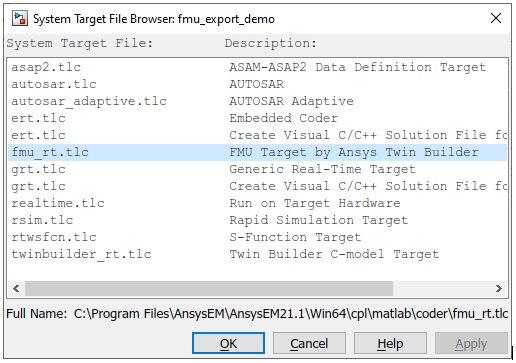
- Open the System Target File Browser and select fmu_rt.tlc as shown below:
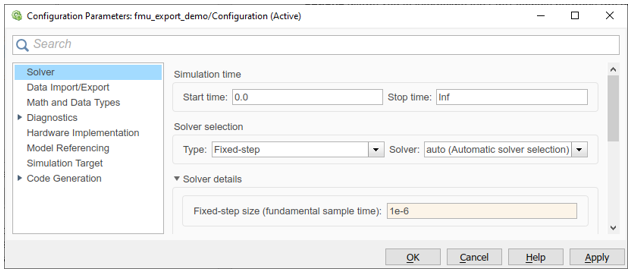
- The Configuration Parameters dialog box appears. Select Solver from the left pane.
- Set the Simulation time > Stop time to Inf. This ensures the model uses the end time of the simulation environment, as well as guarantees the most flexibility as opposed to a fixed end time. If you do set a fixed end time, the model output is constant after that time has passed.
- Set the Solver selection > Type to Fixed-step. The fixed step size influences the simulation's accuracy and speed. A small sample time here could slow down the simulation dramatically, while a large sample time may lead to inaccurate results. A value change on an input port is not recognized by the Simulink model between two samples.
-
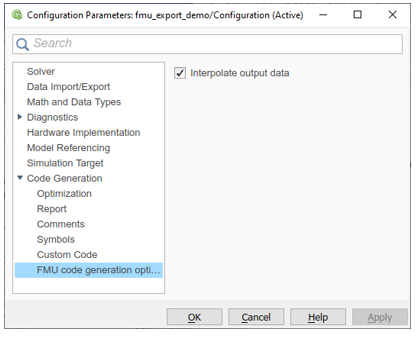
Select Code Generation > FMU code generation from the left pane. Select the Interpolate output data check box to interpolate the FMU outputs between two samples. If you clear it, then output between any two samples will be constant.