
Component Dialog Wizard Layout Toolbar
The Component Dialog Wizard layout toolbar contains these commands:
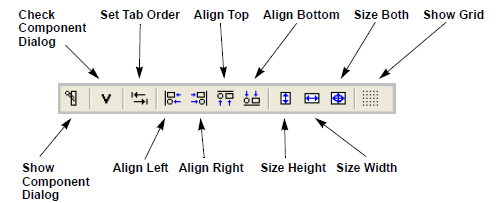
- Show Component Dialog – Generate a preview of the component dialog box.
- Check Component Dialog – Start the utility for checking if the component dialog box is complete with respect to non-conservative input nodes and free values.
- Set Tab Order – Start the utility for setting the tab order of component dialog box elements.
- Align Left – Align all selected dialog box elements with the left edge of a reference element.
- Align Right – Align all selected dialog box elements with the right edge of a reference element.
- Align Top – Align all selected dialog box elements with the top edge of a reference element.
- Align Bottom – Align all selected dialog box elements with the bottom edge of a reference element.
- Size Height – Size all selected elements to have the same height as a reference element.
- Size Width – Size all selected elements to have the same width as a reference element.
- Size Both – Size all selected elements to have the same height and width as a reference element.
- Show Grid – Toggle display of the Component Dialog Wizard's grid.