
Adjusting Symbols and Pins
The Adjust Symbol and Pins... menu item appears in the context menu when a single component is selected and the component's symbol has a rectangle that matches the graphic extent such as those for auto-generated symbols, including those for coupling components and components representing subcircuits.
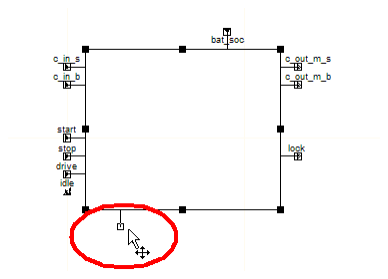
Use Adjust Symbol and Pins... to move unconnected pins around the circumference of the bounding rectangle. You can also resize the rectangle.
- You can move a pin to any vacant grid location
(a grid location not occupied by any other of the selected component's
pins). Its pin stem rotates depending on the side to which
the pin is moved.
 Note:
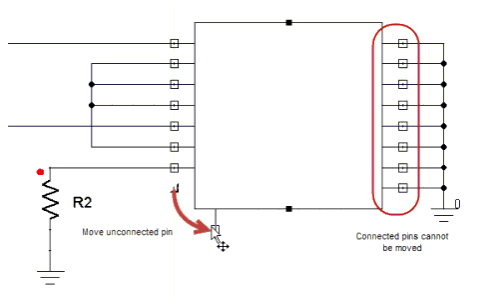
Note:Pins with connections cannot be moved. The Message Manager pane displays a reminder if you attempt to move a connected pin.
- Moving an unconnected pin onto a wire or pin of another component and accepting the changes causes a connection to be made.
- With no pins connected, there are eight handles for resizing the rectangle. When the rectangle is resized, any unconnected pins will move proportionately, snapping to the nearest grid point.
- Connected pins constrain to how the rectangle
may be resized. A connected pin on one side of the component prevents
that side from moving (no handles appear on that side or its corners),
though you can lengthen or shorten that side of the rectangle by moving
a corner on the opposite side.
- If the symbol has a picture whose size matches the rectangle (such as for coupling components), the picture is resized as the symbol is adjusted.
To accept the changes, press the Enter key, or right-click and select either Finish or Place and Finish. To abort the command and discard changes, press either the Backspace or Esc key, or right-click and select either Back or Cancel.
The changes you make using this command are applied to a copy of the component's original symbol, which is used uniquely by the selected schematic component instance. To revert to the original symbol, right-click the component and select Revert to default symbol.