Crosstalk Scan Automation
You can use an XML configuration file to control the simulation flow to drive impedance, frequency and time domain scans non-graphically using siwave_ng.
Reference an XML file in the exec file passed as a command line argument to siwave_ng through a CrosstalkScanConfigFile directive:
CrosstalkScanConfigFile "C:/users/ansys/siwave_scan.xml"
In all of the examples given below, net names can be specified using Perl regular expressions.
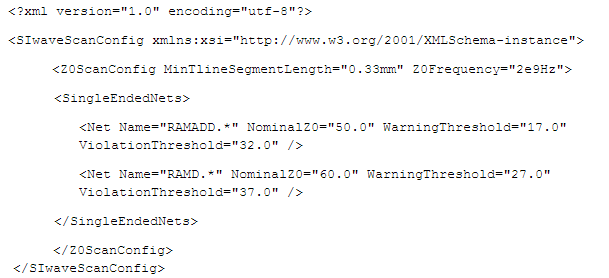
To run an impedance scan, use an XML file to specify the nets to include in the simulation along with the percentage values indicating impedance warning and violation thresholds. See example below:
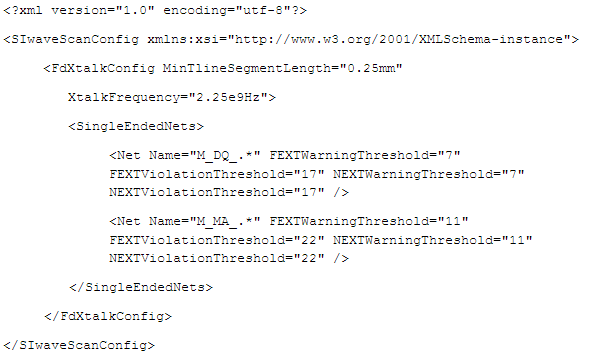
To run a frequency domain crosstalk scan, the XML file should specify the nets to include in the simulation along with the percentage values indicating far and near end crosstalk warning and violation thresholds. See example below:
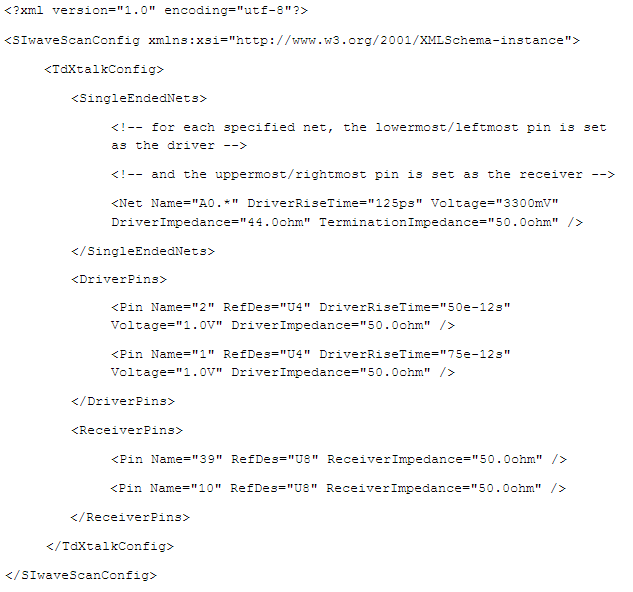
To run a time domain crosstalk scan, you can specify nets to simulate in one (or both) ways:
- Listing the nets to include - for each such net, SIwave automatically sets the lower-most/left-most pin to be the driver and the upper-most/right-most pin to be the receiver.
-
Explicitly list and classify driver and receiver pins.
You can also specify the driver voltage, driver signal rise time, driver impedance and termination/receiver impedance. If these attributes are omitted, SIwave assigns reasonable defaults (1.0V for the driver voltage, 100ps for the driver rise time and 50ohm for the impedances) and proceeds with the simulation. See example below: