
Configuring Padstacks
Padstacks describe the stacking structure of shapes associated with pads and vias. They enable different shapes on different layers. You can easily create and edit padstacks across all board types. Changes to the saved format and functionality are minimal, since the padstacks are independent of the number of layers in the design.
Padstacks consist of:
- Drill information
- Plane layer information – used for calculating the heat and iso shapes used on plane layers.
- Inner layer information – used for assigning different shapes for used/unused component pads.
The Padstack Editor displays in the same pane as Stackup Layers.
If that pane has been closed, select View > Toolbars and Docking Windows > Reset Workspaces. Then, ensure the Padstack Editor tab is selected:
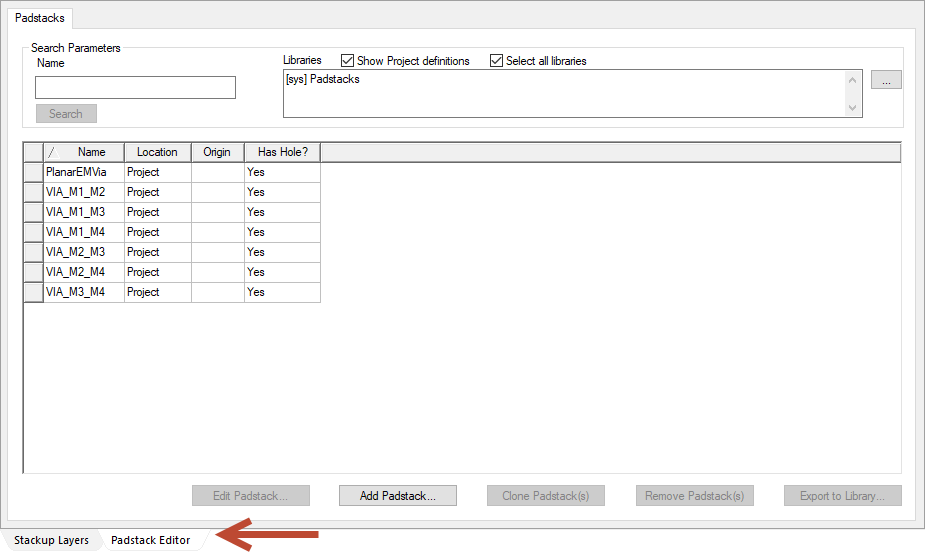
The Padstack Editor consists of the following areas:
- Search Parameters – allows you to search for a padstack by name.
- Padstack List – lists padstacks in the selected library or libraries.
- Padstack Options – buttons at the bottom of the pane allow you to add, edit, clone, or remove padstacks. You can also use them to access padstack settings.