
Toggling Terminal Type
By default, Q3D Extractor's AC RL and DC RL solvers use Constant Voltage (equipotential) terminals. For AC-RL calculations, a constant voltage is held over the perimeter of the terminal face. For DC-RL calculations, a constant voltage is held over the area of the terminal face.
However, in some applications, the properties of these terminals can lead to unwanted or non-physical inductance values.
An alternate form of excitation, the Uniform Current, enforces the condition that the current along the perimeter of a terminal is uniformly distributed for AC-RL calculations, and that the current over the area of a terminal is uniformly distributed for DC-RL calculations.
For AC-RL calculations, both Constant Voltage and Uniform Current terminals use the following procedure for extraction:
- For excitation of the structure, one terminal is excited with 1V while all other terminals are kept at 0V.
- Q3D Extractor solves the system equation:

and calculates inductance using the terminal equation:
with Y being the inverse of jωL.
For DC-RL calculations, see: Extracting DC Inductance from the Field Solution.
The differences between Constant Voltage and Uniform Current are described below.
Constant Voltage
- The potential on the terminal perimeter is constant for AC calculations, and constant on the terminal area for DC calculations.
- The current distribution is non-uniform on the perimeter of the terminal, or on the terminal area.
- Introducing additional terminals will change the path of the current, and self-inductance entries may also change.
Uniform Current
- Forces a uniform current distribution on the perimeter of the terminals for AC calculations, or on the area of the terminals for DC calculations to approximate those terminals as point ports.
- For terminals comprising multiple disjoint facets, each facet has its own constant current density different from all other facets. This is for the scenario of a terminal defined over a pingroup.
- The voltage on the terminal is not constant, and voltage (1V or 0V) will be observed at one point only.
- Due to the uniform current distribution, the self-inductance is usually higher.
Changing a Terminal's Type
You can change a terminal's type to either Constant Voltage or Uniform Current, as appropriate. Q3D Extractor can support having both types in a single design.
To change the type of a single terminal:
- From the Project Manager, double-click a sink or source terminal.
The [Source / Sink] window appears.
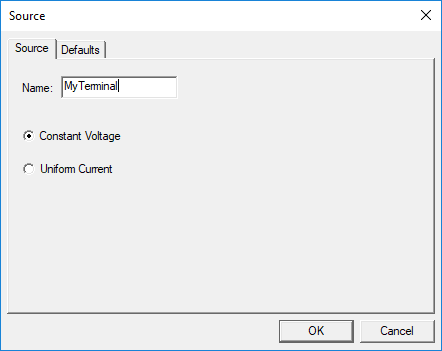
- Select either Constant Voltage or Uniform Current.
- Click OK.
Changing All Terminals
To change all terminals in the design to one type, perform one of the following:
- Select Q3D Extractor > Nets > Toggle Terminal Type > All to [Constant Voltage / Uniform Current].
- Right-click in the modeling workspace and select Toggle Terminal Type > All to [Constant Voltage / Uniform Current].
- In the Project Manager, right-click a terminal and select Toggle > All Terminals to [Constant Voltage / Uniform Current].