
Editing Sources in Q3D Extractor
Change source values in the Edit Sources dialog box.
- Launch the Edit Sources window one of two ways:
- Click Q3D Extractor > Fields > Edit Sources.
- In the Project Manager, right-click Field Overlays and select Edit Sources.
The Edit Sources window appears, containing four tabs:
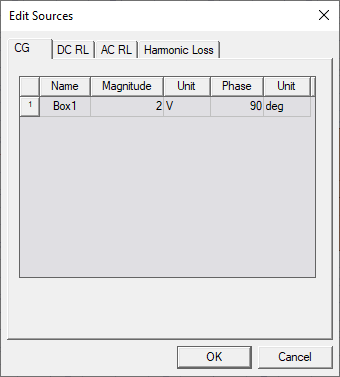
- CG – allows you to set magnitude and phase values.
- DC RL – allows you to select either Voltage or Current, and specify those values. Also provides an Assume true DC in loss calculation check box.
Note:
When Assume true DC in loss calculation is enabled, DC volume loss calculations will ignore phases other than 0 or 180 degrees. The loss is calculated as P = IRI, and loss calculated with this option matches legacy results.
When this option is deselected, the calculation assumes that DC excitation includes sinusoidals at very low frequencies with given phase shift, and the loss is calculated as RMS loss:

- AC RL – allows you to select either Voltage or Current, and specify those values. AC RL voltage and current sources are assumed to be peak quantities.
- Harmonic Loss – allows you to specify real and imaginary currents for each source, in order to compute harmonic loss.
- Select the tab whose values you wish to edit.
- Click OK.