
GetOutputVariableValue
Use: Gets the double value of an output variable. Only those expressions that return a double value are supported. The expression is evaluated only for a single point.
Syntax:GetOutputVariableValue(<OutputVarName>, <IntrinsicVariation>, <SolutionName>, <ReportTypeName>, <SimValueContext>)
Return Value: Double value of the output variable .
Parameters: <OutputVarName>
Type: <string>
Name of the output variable.
<IntrinsicVariation>
Type: <string>
A set of intrinsic variable value pairs to use when evaluating the output expression. If no variables are present, a null string must be used.The Eddy Current solution type requires at least the specification of frequency as shown here while the transient solver will require Time as a minimum entry.
For example: "" (Null String)
"freq=‘60’" (Eddy current example)
<SolutionName>
Type: <string>
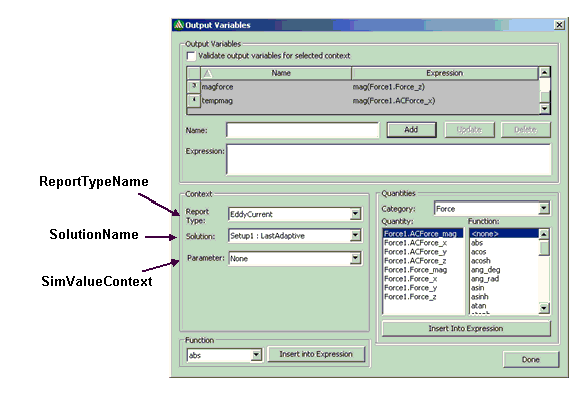
Name of the solution as listed in the output variables dialog box as shown in SimValueContext.
For example: "Setup1 : Last Adaptive" or "Setup1 : Transient"
<ReportTypeName>
Type: <string>
The name of the report type as seen in the output variable dialog box.
If the Output Variable is based upon a field quantity, then the ReportTypeName must be set to "Fields".
<SimValueContext>
Type: <Array>
Context for which the output variable expression is being evaluated. This section is related to the Parameters or Geometry fields in the UI that specify a context for extracting data quantities. This can be an empty string if there is no context.
The Context section of the Output Variables dialog box contains the information that is required when getting the value of the Output Variable. Note these values when using the dialog box to create an Output Variable.
|
Hint |
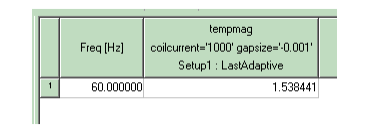
Variation variables can be identified by doing a Data Table report and viewing the variable specifications in the table header. For example:
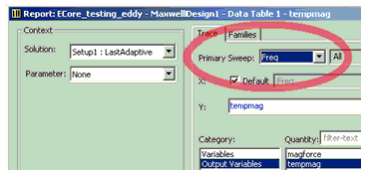
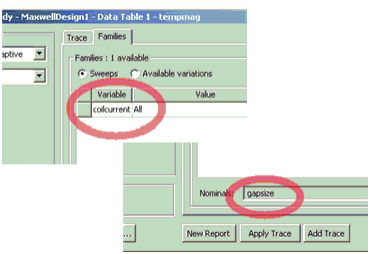
Also, as shown below, the Trace and Families tabs on the Report dialog box can be used as illustrated to identify variation variables.
|
Example:
Dim Val
Val= oModule.GetOutputVariableValue("tempmag",
"freq='60' coilcurrent='1000'
gapsize='-0.001'", "Setup1 : LastAdaptive", "EddyCurrent", "")
Val= oModule.GetOutputVariableValue("tempmag",  "coilcurrent='1000'
gapsize='-0.001'",
 "Setup1 : LastAdaptive", "Magnetostatic", "")
Val= oModule.GetOutputVariableValue("BFieldMag",
 "", "Setup1 : LastAdaptive",  "Fields", "")
Val= oModule.GetOutputVariableValue("MagBatPoint1",
"freq='60' coilcurrent='1000'
gapsize='-0.001' Phase=’0deg’", "Setup1 : LastAdaptive",  "Fields", Array("Context:=", "Point1"))