
Feedback Iterator GUI Operations
The Single Iteration Update action allows you to run a single iteration worth of updates, as follows:
- Updates the Electromagnetics product system, which will incorporate any previous feedback from the downstream system.
- Updates the downstream system.
- All coupled systems (Electromagnetics product, Electromagnetics product Downstream, and Iterator) are in the UpToDate state.
- Iterator's “Iterations Completed” property increments by 1.
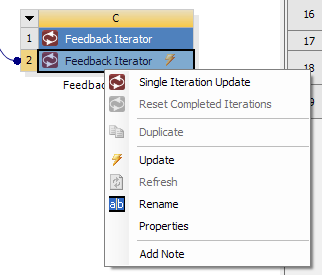
Right-clicking the Feedback Iterator component and selecting Update allows you to run iterations automatically. Iterations continue to run either until convergence criteria are met, or until the Max Iterations value is reached.
Note: After getting temperature feedback from Fluent, Maxwell solving starts from the last adaptive, which means there is NO more adaptive pass solving. Consequently, instead of looking for the expression cache value in the adaptive solution, users should look for it in the last adaptive solution. For Last Adaptive, the expression cache value can be displayed from Results > Create Fields Report > Data Table.