
Sweeping Along a Path
Sweep a 1D or 2D object along a path that is defined by an open or closed polyline using the Draw > Sweep > Along Path command.
Best Practices
Adhere to the following best practices for good sweep outcomes using the Parasolid geometry kernel:
- When sweeping along a path that is not closed (i.e., the start and end point are not the same), ensure that the start point of the path is on the profile being swept.
- When sweeping a profile around a closed path, ensure that the path intersects the profile.
- Parasolid sweep operator preserves the angle between the profile and path. Ensure that the profile is perpendicular to the path if it is supposed to be perpendicular.
- If the sweep profile is rotationally symmetric (e.g., circle, rectangle, square), position the profile so that the path intersects the profile at the center of the profile. If the profile does not have a center, allow the path to go through or start at the vertex of a profile.
If the path curve is tangential to the sweep profile, then the sweep will fail.
To sweep an object along a path:
- Create the polyline to be used as a path.
- Select the object you want to sweep and then select the new polyline.
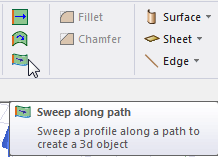
- Click Draw > Sweep > Along Path or, from the Draw ribbon tab, click the Sweep along path icon:
The Sweep along path dialog box appears.
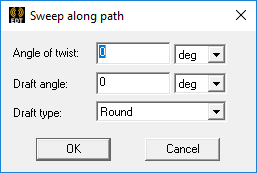
- Type an angle in the Angle of twist text box and choose the desired unit of measure.
This is the angle you want the profile to rotate about the sweep path vector as it is swept through the complete path.
- Type an angle into the Draft angle text box and select the desired unit of measure.
This is the angle to which you want the object's profile, or shape, expanded (positive angle) or contracted (negative angle) as it is swept. Among other purposes, drafts make it easy to remove molded or cast parts from their molds.
For 1D objects, the draft angle alters the sweep direction but does not alter the length of the object as it is swept. For example, a 10 mm straight line swept with a 5-degree draft angle does not produce a trapezoidal 2D object. It produces a rectangle with a constant 10 mm width but tilted 5 degrees relative to the specified sweep path.
- Select one of the following Draft type options from the drop-down menu. The draft type instructs the modeler whether to maintain the original object shape and how to transition between adjacent faces. This setting affects the results when sweeping 2D objects into 3D solids or when sweeping lines and curves into 3D sheets.
- Extended
- Round
- Natural
For a complete description of the behavior of each of these three options, see: Draft Types.
- Click OK.
The object is swept along the path. The polyline object used as the path is deleted. The new object has the properties of the original object. The Properties dialog box appears, enabling you to modify the object's properties.