Setting Up an SVPWM Excitation
Pulse Width Modulation (PWM) is a term used for any method that produces a square wave signal with varying duty cycle and frequency to control the average power delivered to a load. PWM is widely used in applications such as light dimming, switching power supplies, and electric motor drive. In these types of designs, the AC motor needs to be powered by an alternating current excitation, which is supplied by the DC supply voltage through an inverter circuit using power device switches. Controlling how the power switches are turned on and off is accomplished by PWM.
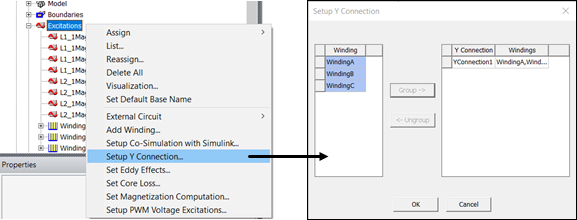
For 3D magnetic transient T-Omega and 2D magnetic transient solutions, Space Vector Pulse Width Modulation (SVPWM) can be directly created in Maxwell for three-phase voltage-excited windings. For all three phases, Maxwell will calculate and create design datasets for the PWM voltage waveforms based on user inputs and automatically set up the winding excitations to use these datasets in transient simulations. The generated waveform represents the Phase-Neutral voltage, and it is only applicable to star (or Y) connected winding. Therefore, ensure that the Y connection is set up for the three windings applied to the SVPWM excitation.
- Before setting up the SVPWM excitation:
- Define three voltage windings.
- Set up the Y connection for the winding. Note that the Y connection is currently available for stranded winding, but it is not supported for solid winding.
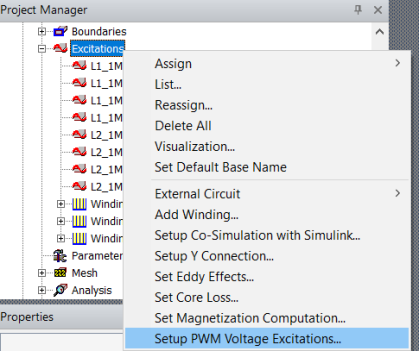
- In the Project Manager tree, right click Excitations, and select Setup PWM Voltage Excitations...
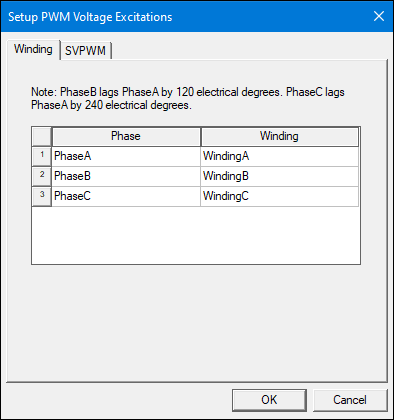
- In the Setup PWM Voltage Excitations window that opens, arrange the three windings to represent the three phase windings (PhaseA, PhaseB and PhaseC) accordingly.
- Click on the SVPWM tab, and input the corresponding parameters for SVPWM. Example parameters are shown below:
- DC Bus Voltage – Specifies the voltage available at the main DC bus as input to the inverter. This value can be entered directly or defined using a design variable.
- Modulation Index (m) – Specifies the ratio between the reference signal to the carrier signal; it determines the amplitude of the fundamental output voltage with respect to the available DC bus voltage as described by the equation below.
- Output Voltage Frequency (Fref) – Defines the fundamental frequency of the reference signal, and therefore, the PWM output voltage.
- Switching Frequency (Fsw) – Defines the carrier signal frequency that is used to generate the PWM switching signal. A typical value for traction inverters is between 10 – 20 kHz.
- Phase Delay – Defines the phase delay angle of the reference signal (and hence the output voltage). The phase delay depends on the operating point, and it can be provided from system-level simulation or by running a transient simulation with an ideal sinusoidal current and checking the phase delay on the output of the phase voltage.
- Number of Sampling Points per Switching Period – Defines the rate at which the carrier signal and the reference signal are compared to generate the switching signals. This value is important to correctly capture the switching events. The default (recommended value) is 100.
- Click OK.
Alternatively, from the menu bar, select Maxwell 2D/3D > Excitations > Setup PWM Voltage Excitations.
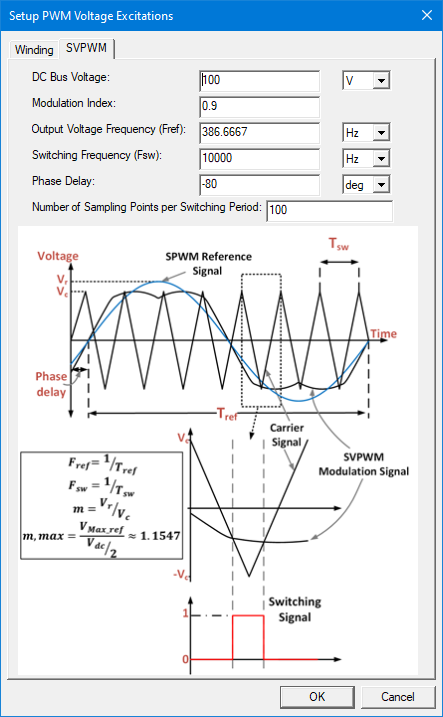

The range of the modulation index is 0 < modulation index ≤ 2/sqrt(3) (i.e., approx. 1.1547) for SVPWM. Note that this value cannot be defined with a variable.
To understand how the maximum modulation index is calculated, start with the figure below, which shows the space vector hexagon (represented by six sectors and eight vectors). Each vector represents a different switching state of the inverter.
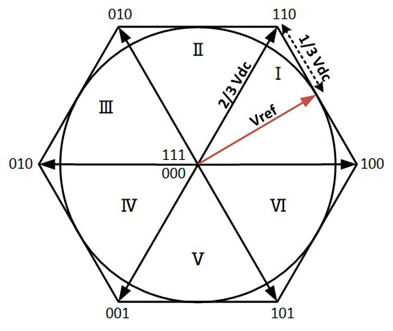
The vector Vref is the reference revolving voltage vector formed from the three phase sinusoidal voltages; at each sector, this vector is realized by alternating between the two nearest space vectors along with the zero vectors.
The circle inside the hexagon represents the maximum value possible for Vref (and hence the output voltage) that can be produced with the SVPWM technique.
Knowing that the magnitude of each vector is 2/3 VDC, the maximum value of the output voltage (Vref) can be computed as


From these definitions, the maximum modulation for SVPWM can be derived as

The technique used by the Maxwell application to implement SVPWM excitation computes the pattern of voltage pulses for each of the three datasets by comparing a triangular carrier wave with frequency Fsw and amplitude 1 to three reference functions.
Unlike for sinusoidal PWM, where the reference functions are sinusoidal, for this SVPWM implementation, the three reference functions (Va_Ref, Vb_Ref, Vc_Ref) need to be constructed as a first step. This is achieved by superposing the common mode voltage (VCM) to the three sinusoidal signals (Va_0, Vb_0, Vc_0) of a three-phase system:
Va_Ref = Va_0 + VCM
Vb_Ref = Vb_0 + VCM
Vc_Ref = Vc_0 + VCM
Va_0 is defined as ModulationIndex*sin(2*pi*Fref*time-Phase Delay). Vb_0 and Vc_0 lag Va_0 by 120° and 240°, respectively.
The amplitude Vmax can be calculated as (DC Bus Voltage)/2 * Modulation Index.
At every timestep, the common mode voltage is calculated as half of the mid-valued function among Va_0, Vb_0, Vc_0.
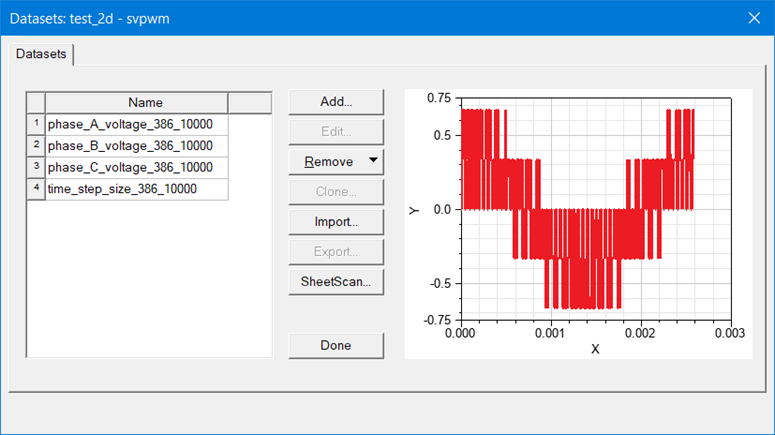
Three datasets of the voltage (Phase_X_voltage_<Fref>_<Fsw>) vs. time will be generated. The datasets are generated by comparing the reference signal to the triangular carrier at a sampling frequency Fsw*Number of Sampling Points per Switching Period. Subsequently, the datasets are reduced by removing the timesteps where no change of the voltage values occurs.
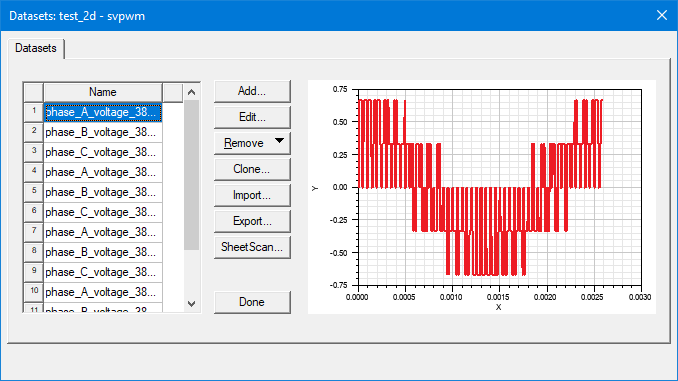
The datasets represent the three normalized PWM phase voltages for one electrical cycle. The phase sequence of the generated dataset is A-B-C with Phase B and C lagging Phase A with 120 deg and 240 deg, respectively. The generated datasets can be accessed from Maxwell > Design Datasets or by right clicking on the model in the Project Manager tree and selecting Design Datasets. The datasets shown below are based on previous example settings; the plot for phase_A_voltage is displayed.
The phase datasets generated are added to the corresponding Winding Voltage value field in the format of pwl_periodic, which is used to ensure the voltage is periodic in case the simulation is longer than one electric cycle. WindingA is shown as an example:
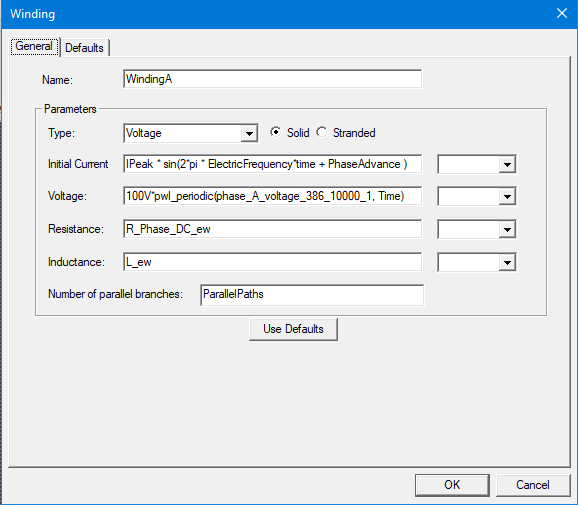
The expression is multiplied by the DC bus voltage that is defined on the PWM Voltage Excitations tab. All the other inputs will not be changed. If the DC Bus Voltage was defined as a variable, the variable will be used instead:
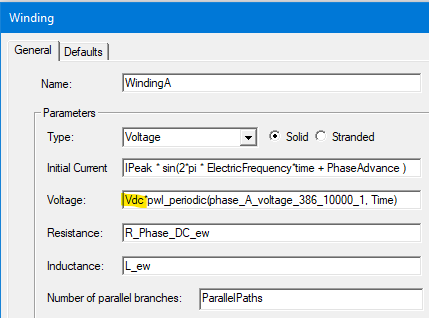
Users can change the Voltage value by adding multiples to the pwl_periodic function.
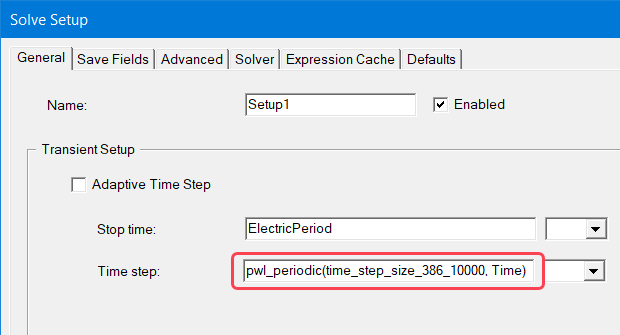
An additional dataset time_step_size_<Fref>_<Fsw> is created. This dataset tracks the exact instance the switching happens and will be used to define the variable time step in the transient setup to ensure that all switching events are captured with the minimum number of time steps possible. This dataset will be added to the Solve Setup Time step value field in the pwl_periodic format:
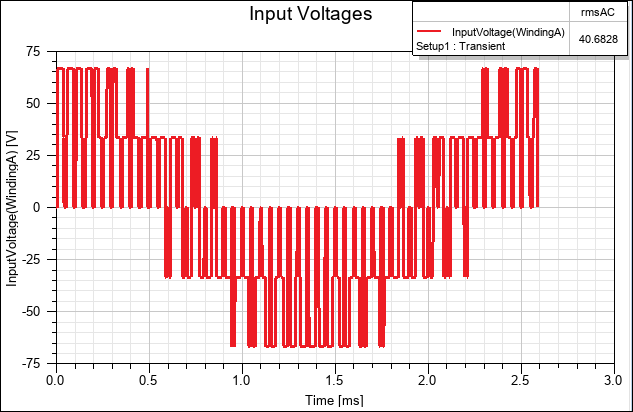
Once the design is analyzed, the user can plot the PWM voltage applied to the windings, which resembles the dataset created by PWM Voltage Excitations function, as shown in the following images: