
Defining Functional Material Properties
Any material property that can be specified by entering a constant can also be specified using a mathematical function. This is useful when you are defining a material property whose value is given by a mathematical relationship — for instance, one relating it to frequency or another property’s value. When defining or modifying a material’s properties, simply type the name of the function in the appropriate Value box.
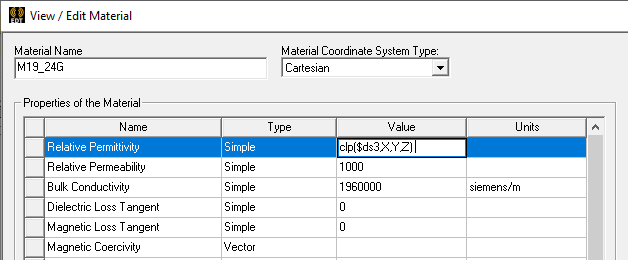
Optionally, for 2D and 3D transient designs, you can enter an expression for a 3D(X,Y,Z) dataset in the Value box for the properties of conductivity, permeability, and permittivity, as shown in the figure below. The 3D dataset models the spatially varying material property change with respect to location along the object. For detailed information on using 3D(X,Y,Z) datasets, please refer to Setting a Spatial Modifier.
By default, not all of the available properties are displayed in the materials table. Only the properties commonly used by the product are displayed. To view the complete table of properties, see Filtering Materials.