
Distributed Analysis Configuration
After you have selected the active distributed machine configuration, you can edit its configuration in the Analysis Configuration window.
To edit the configuration:
- Access the Analysis Configuration window one of three ways:
- From the Simulation tab, click Analysis Config.
- Click Tools > Edit Active Analysis Configuration.
- From the HPC and Analysis Options window (opened from the HPC Options icon on the Simulation ribbon or Tools > Options > HPC and Analysis Options), select the configuration and click Edit.
Note:You can also access the Analysis Configuration window from the HPC and Analysis Options window by clicking Add or Copy. When using Add or Copy, the steps are the same as below, but you will need to specify a Configuration Name. The name cannot be empty and it cannot be a reserved name.
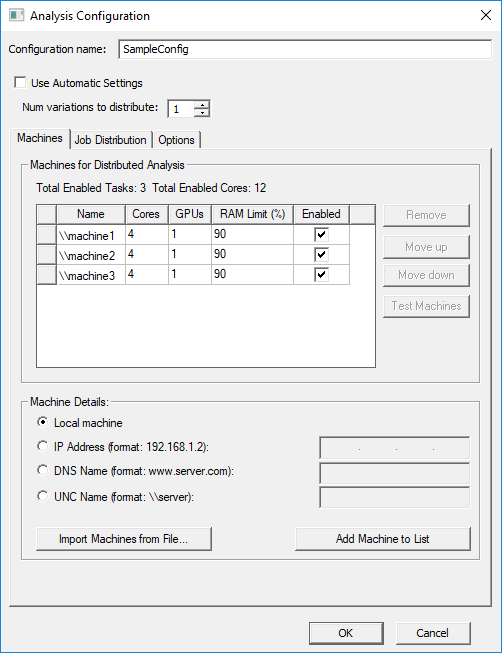
The Analysis Configuration window appears.
 Note:
Note:Available options may vary slightly depending on the solver and design.
- If automatic settings are supported, the Use Automatic Settings check box allows you to select this option and set parameters based on the best use of available resources for the current analysis. Deselecting it enables the Job Distribution tab, where you can assign resources manually.
For Maxwell, this setting is currently only supported for 2D and 3D Transient and for 3D eddy current designs.
For 2D and 3D Transient designs, the Use Automatic Settings option distributes one excitation to each machine listed in the configuration. When this option is enabled, a minimum of 2 cores must be assigned. Each machine uses all cores assigned to it while solving its excitation. Unlike automatic frequency setup, the machines are assigned sequentially without regard to machine capability. For 3D eddy current design with Use Automatic Settings, you must assign a minimum of 4 cores.
- Use the tabs to navigate through the rest of the settings:
- Machines – contains the machine list. You can add, enable, remove, test, and reorder machines from the list.
- Job Distribution – when Use Automatic Settings is deselected, this tab appears and allows you to select job distribution settings manually.
- Options – allows you to specify additional options, depending on the design type.
- Click OK to save the configuration settings.