
Introduction
This document is intended as supplementary material to Icepak for beginners and advanced users. It includes instructions to create and use a Reduced Order Model (ROM) using Ansys Icepak and Ansys Twin Builder.
There are two steps to create ROM model:
- Create the step response files. These files can be created automatically using Icepak. This tutorial demonstrates how to create the required step response files in Icepak.
- Create the ROM in Twin Builder. This tutorial also presents the procedure needed to create a state-space model in Twin Builder.
This chapter contains the following topic:
In this project, we have four FET’s (Field-effect transistor) placed on a board and a heat sink mounted on one of the FET. These FET’s generate heat which gets dissipated into the environment. Forced convection is used for thermal management of the system.
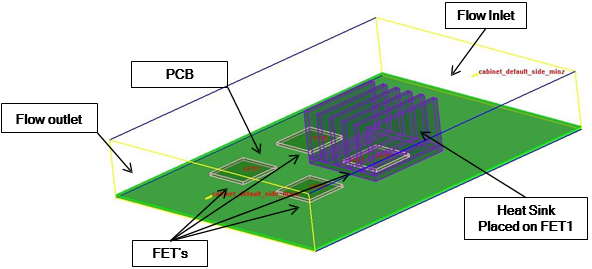
Figure 1-1: Sample Project
We are interested in temperature rise at the four FET’s due to its power dissipation. From a system point of view, power dissipation from the FET’s are the inputs and the temperature rise at the four FET’s are the outputs. We will create a ROM which can efficiently calculate temperatures at the pre defined outputs under any transient heat dissipation scenario.
The state-space approach is generally valid for linear systems consisting of forced convection flow and insignificant radiative heat transfer.