
Thermoelectric Cooler - Create TEC
The Run TEC toolkit enables you to run an analysis of a design that includes a thermoelectric cooler.
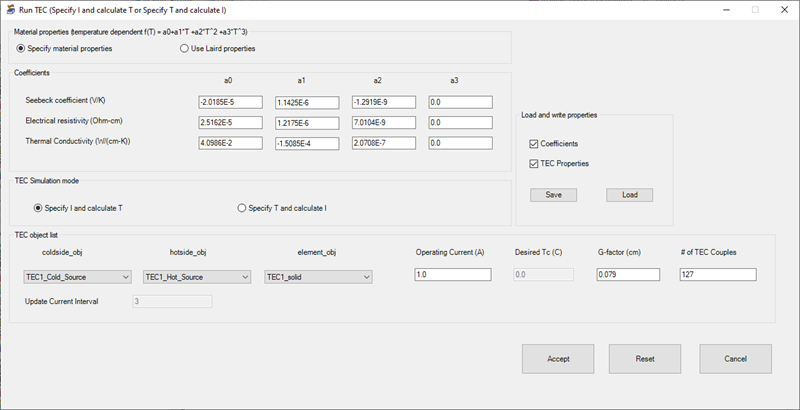
| Material properties | Select Specify material properties to define the Coefficients values or select Use Laird properties to use pre-defined Laird values. |
| Coefficients | If you selected Specify material properties, enter values for Seebeck coefficient (V/K), Electrical resistivity (Ohm-cm), and Thermal conductivity (W/(cm-K)) under a0, a1, a2, and a3. The default coefficients shown are compatible with most Marlow TECs. |
| TEC Simulation mode | Select Specify I and calculate T to enter an Operating Current (A) value and calculate a Desired Tc (C) during the solution. Or select Specify T and calculate I to enter a Desired Tc (C) and calculate Operating Current (A) during the solution. |
| TEC object list |
Define the following parameters:
|
| Load and write properties | If you want to save the coefficients and/or TEC properties and load them in a later session, select Coefficients and/or TEC properties under Load and Write properties and click Save. Use the TEC coefficients data panel to navigate to a location to save the file. |
| Accept | Click Accept to run the analysis. |
| Reset/Cancel | Click Reset to restore the default values. Click Cancel to close the Run TEC toolkit without running the analysis. |