
Min/Max Locations
Min/Max Locations allows you to identify the minimum and maximum locations of a selected quantity, such as temperature. You can also create monitor points at the identified locations.
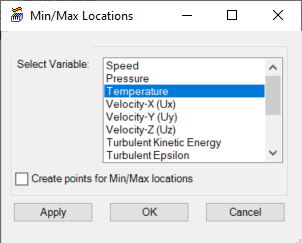
|
Select Variable |
In the Select Variable field, select the quantity for which you want to identify the minimum and maximum locations. |
| Create points for Min/Max locations | Enable Create points for Min/Max locations to create monitor points at the identified minimum and maximum locations. |
| Apply | Click Apply to locate the min and max locations for the selected quantity and, if enabled, create monitor points at the locations. |
| OK | Click OK to locate the min and max locations for the selected quantity and, if enabled, create monitor points at the locations. Clicking OK closes the Min/Max Locations dialog box. |
| Cancel | Click Cancel to close the Min/Max Locations dialog box. |